TutorFlow Developer Guide
Acknowledgements
- This project is based on the AddressBook-Level3 project created by the SE-EDU initiative. The architecture, the command and parser design and the testing approach are adapted from it.
- The edit, archive, delete and add icons in the student-card controls are from Material Design Icons, licensed under the Apache License 2.0.
- The TutorFlow application icon was supplied by the project team and resized for use as the window icon.
- Libraries used: JavaFX (user interface), Jackson (JSON storage), commonmark-java (showing the bundled User Guide in the Help window), JUnit5 (testing), Monocle (running the user interface tests without a screen), Checkstyle and JaCoCo (code quality and coverage).
- Documentation is built with MarkBind and the diagrams are drawn with PlantUML.
- Notable uses of AI:
- Some team members used AI coding assistants (Claude Code, OpenAI Codex and GitHub Copilot) to help draft code, tests and documentation. Such work can be recognised in the repository history by commits with a
Co-Authored-By: Claudetrailer and by branches namedcodex/orcopilot/. - AI assistants were also used for preliminary reviews of pull requests, for scripts that ran thousands of generated commands against the product to look for crashes and regressions, and for checking the User Guide and Developer Guide against the product and the course rules.
- Each member is responsible for reviewing and testing the AI-assisted changes they submit, and the changes were merged through pull requests.
- Some team members used AI coding assistants (Claude Code, OpenAI Codex and GitHub Copilot) to help draft code, tests and documentation. Such work can be recognised in the repository history by commits with a
Setting up, getting started
Refer to the guide Setting up and getting started.
Design
Architecture
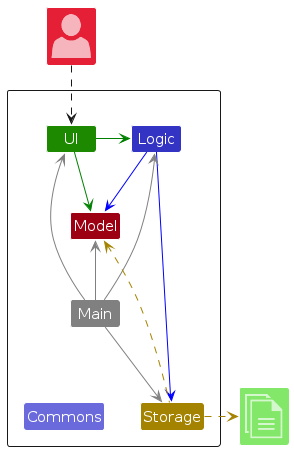
The Architecture Diagram given above explains the high-level design of the App.
The following provides a quick overview of the main components and their interactions.
Main components of the architecture
Main (consisting of classes Main and MainApp) is in charge of the app launch and shut down.
- At app launch, it initializes the other components in the correct sequence, and connects them up with each other.
- At shut down, it shuts down the other components and invokes cleanup methods where necessary.
The bulk of the app's work is done by the following four components:
UI: The UI of the App.Logic: The command executor.Model: Holds the data of the App in memory.Storage: Reads data from, and writes data to, the hard disk.
Commons represents a collection of classes used by multiple other components.
How the architecture components interact with each other
The Sequence Diagram below shows how the components interact with each other for the scenario where the user issues the command delete 1.
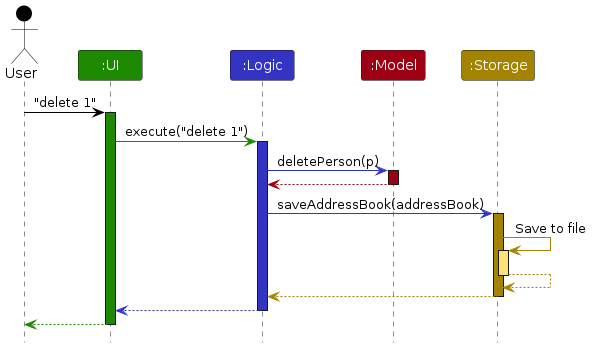
Each of the four main components (also shown in the diagram above),
- defines its API in an
interfacewith the same name as the Component. - provides its functionality through a concrete
{Component Name}Managerclass that implements the corresponding API interface.
For example, the Logic component defines its API in Logic.java and implements it in LogicManager.java. Other components interact with a component through its interface rather than its concrete class, preventing them from coupling to that component's implementation, as illustrated in the following partial class diagram.
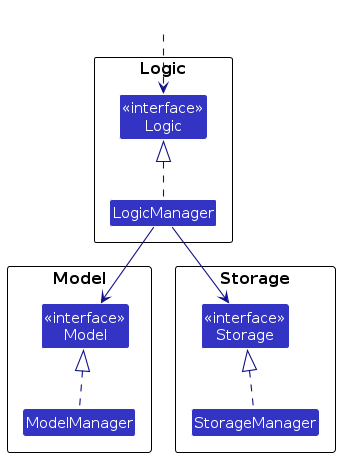
The sections below give more details of each component.
UI component
The API of this component is specified in Ui.java
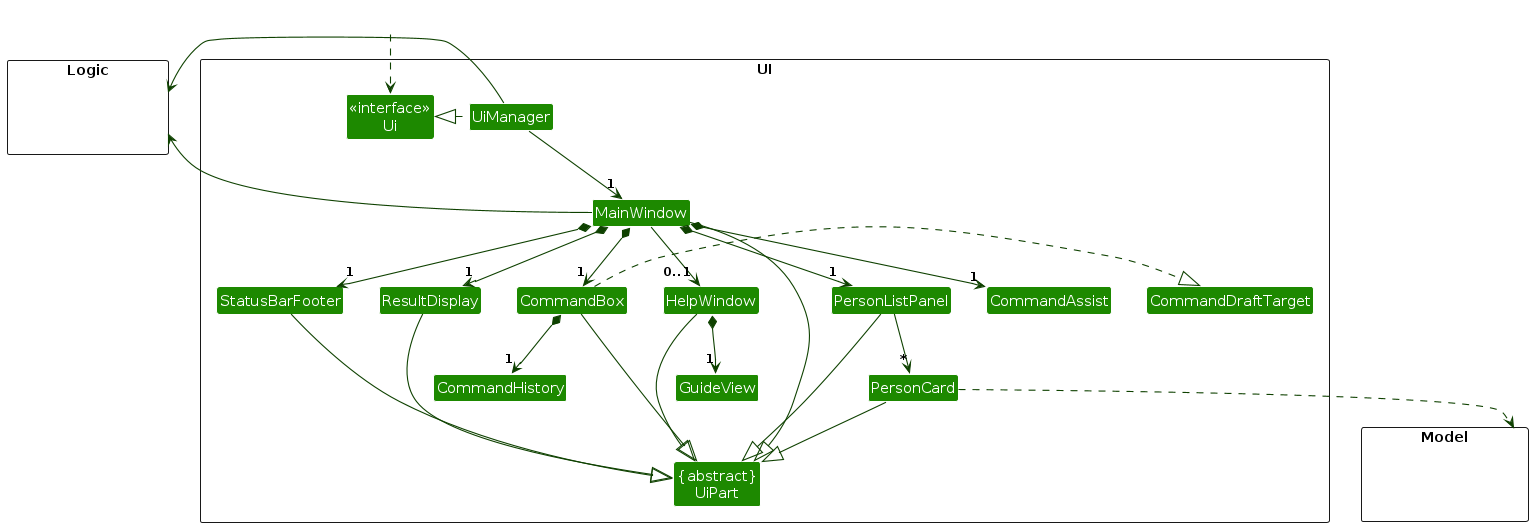
The UI consists of a MainWindow and its parts, such as CommandBox, ResultDisplay, PersonListPanel, and StatusBarFooter. All of these, including MainWindow, inherit from the abstract UiPart class, which captures common behavior among classes that represent visible GUI parts.
CommandBox also lets the user step through the commands entered in the session with the Up and Down keys. The steps are kept by CommandHistory, a plain class with no JavaFX dependency, so it can be unit tested. It keeps the latest 100 commands, ignores blank commands and a repeat of the previous command, and remembers what the user had typed before stepping back so that Down returns to it. A command is recorded when it is entered, whether it succeeds or not. A failed command is left in the text field, and CommandHistory does not offer it again on the first Up, because it is already shown. A clear button overlays the right edge of the text field only while it contains text; it clears the text and returns focus without executing a command.
CommandAssist is the shared layer for the student-card shortcuts. It formats drafts using CliSyntax prefixes and command words, writes them through the small CommandDraftTarget interface implemented by CommandBox, and never calls Logic. PersonCard only reports the card's displayed index and the chosen field; it does not construct command strings or change model data. Field-editing mode is closed through a callback owned by CommandAssist, so a successful command, a new action on another card, and a change to the displayed list all leave the card and command box in a consistent state. CommandBox exposes the current draft and focus operations through CommandDraftTarget, and its clear control is a separate button layered over the text field rather than part of the command text.
The card's action buttons are rendered from PersonListCard.fxml. The subject pencil is added to the same FlowPane as the subject labels so it follows the final subject; it is not a separate row. Cancel is shown beside the card-level Edit control only during field-editing mode. All action buttons have accessible names and tooltips, and the card itself is focus-traversable so the actions can be reached without a mouse. Hover, keyboard focus and a one-tap touch fallback reveal the card actions.
The shortcut draft uses the same displayed index as the indexed commands. PersonListPanel observes its filtered list; when that list changes, an unchanged prepared draft is cleared and field-editing mode is closed, because the old number could now identify another student. A draft that the user edited is kept, as required for predictable cancellation. CommandAssist also prints help COMMAND to standard output for each shortcut, allowing the existing help command to own the usage text instead of duplicating it in the UI.
The UI component uses the JavaFX UI framework. The layouts of these UI parts are defined in matching .fxml files in src/main/resources/view. For example, MainWindow.fxml specifies the layout of MainWindow.
The UI component,
- executes user commands using the
Logiccomponent. - listens for changes to
Modeldata so that the UI can be updated with the modified data. - keeps a reference to the
Logiccomponent, because theUIrelies on theLogicto execute commands. - depends on some classes in the
Modelcomponent because it displaysPersonobjects from the model.
Logic component
API : Logic.java
Here's a (partial) class diagram of the Logic component:
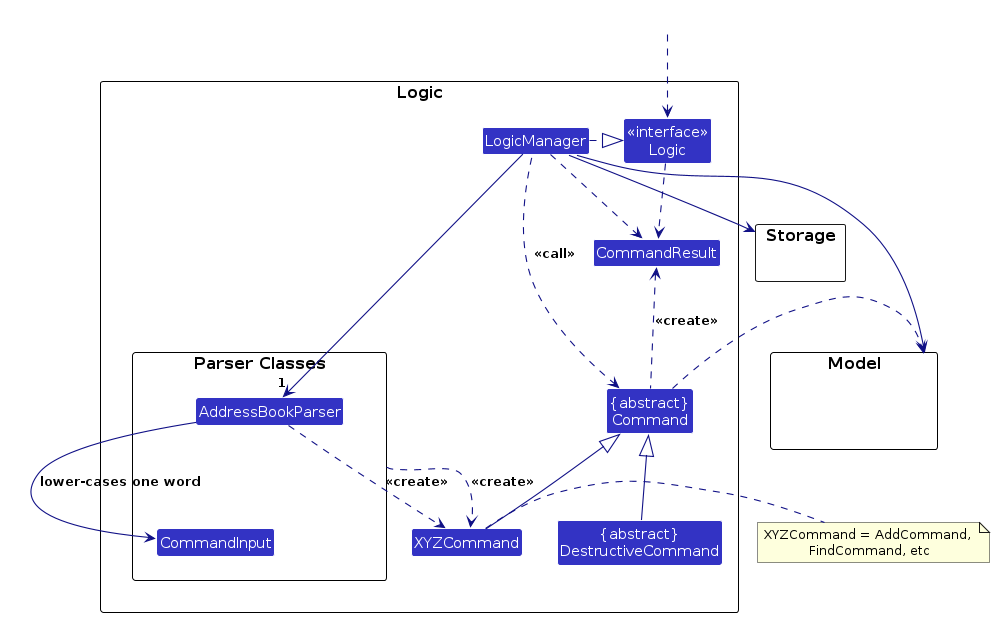
The sequence diagram below illustrates the interactions within the Logic component, taking execute("delete 1") API call as an example.
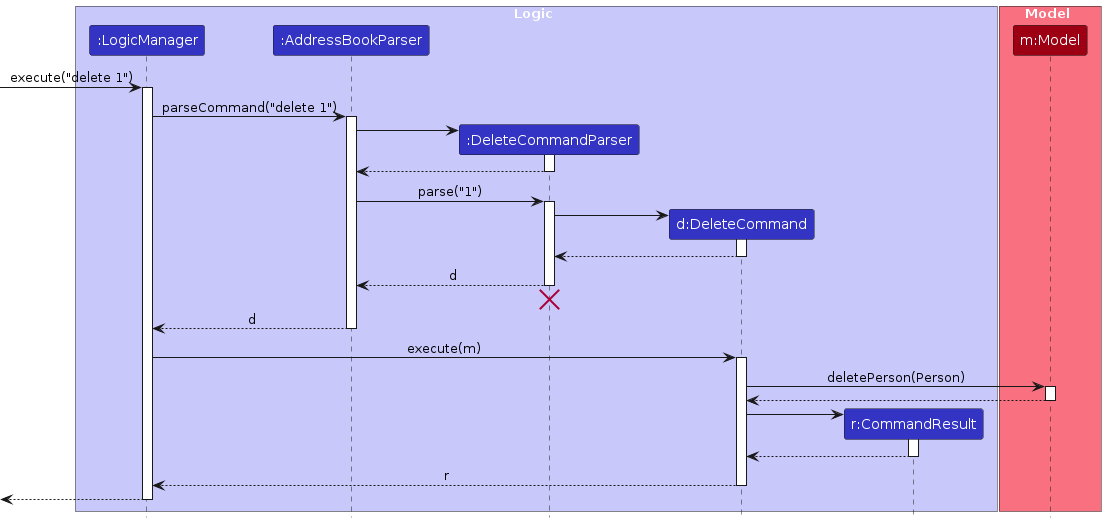
Note: The lifeline for DeleteCommandParser should end at the destroy marker (X), but due to a limitation of PlantUML, the lifeline continues till the end of diagram.
All subject values entered through commands go through ParserUtil#parseSubject. It normalizes the text,
capitalizes the first Unicode letter with an uppercase mapping under Locale.ROOT, and then creates the immutable
Subject. This keeps add, edit, lesson subject selection and subject filters consistent. Stored values loaded by
Subject and JsonAdaptedSubject keep their original case, so existing data files and historical lessons are not
rewritten.
How the Logic component works:
- When
Logicis called upon to execute a command, the command is passed to anAddressBookParserobject, which in turn creates a parser that matches the command (e.g.,DeleteCommandParser) and uses it to parse the command. - This results in a
Commandobject (more precisely, an object of one of its subclasses e.g.,DeleteCommand) which is executed by theLogicManager. - The command can communicate with the
Modelwhen it is executed (e.g. to delete a person).
Note that although this is shown as a single step in the diagram above for simplicity, the code can require several interactions between the command object and theModelto complete the operation. - The result of the command execution is encapsulated as a
CommandResultobject which is returned fromLogic.
Here are the other classes in Logic (omitted from the class diagram above) that are used for parsing a user command:
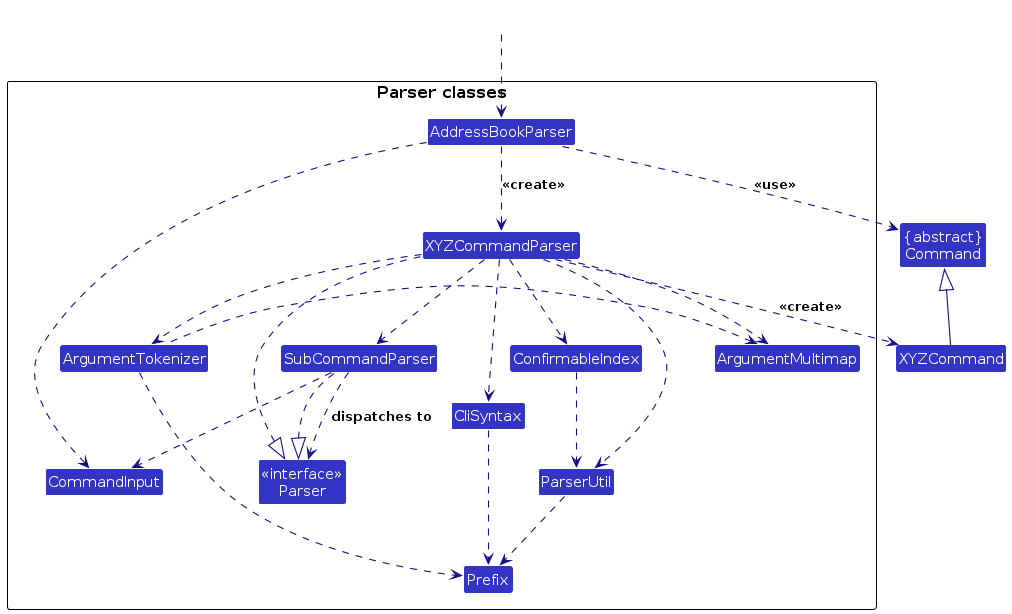
How the parsing works:
- When called upon to parse a user command, the
AddressBookParserclass creates anXYZCommandParser(XYZis a placeholder for the specific command name, e.g.,AddCommandParser). The parser uses the other classes shown above to parse the user command and create anXYZCommandobject (e.g.,AddCommand). TheAddressBookParserreturns that object as aCommandobject. - All
XYZCommandParserclasses, such asAddCommandParserandDeleteCommandParser, implement theParserinterface so they can be treated similarly where appropriate, for example during testing. - Arguments are parsed by each
XYZCommandParser, not byAddressBookParser, because the prefixes, required fields and error messages differ between commands. Logic that more than one parser needs lives in shared classes instead of being copied:ArgumentTokenizer,ArgumentMultimapandParserUtilsplit and validate prefixed values, and all prefixes are defined once inCliSyntax.- An index that is not a positive whole number is reported as
Invalid command format!with the command's usage. A parser gets this by callingParserUtil.parseIndex(value, usage). CommandInputsplits the first word from the rest of an input and lower-cases that word, so command words and sub-command words do not depend on letter case. The same holds for theconfirmkeyword, whichConfirmableIndex,ClearCommandParser,DemoCommandParserandLessonSeriesCancelCommandParsercompare ignoring case. Prefixes such asn/remain case-sensitive.AddressBookParseruses it for the command word, andSubCommandParseruses it for the sub-command word oflessonandtask, andPayCommandParserandChargeCommandParserforpay list,pay reverseandcharge reverse.SubCommandParseris given oneParserper sub-command word, so adding a sub-command means registering one more parser.ConfirmableIndexparses an index with an optionalconfirmkeyword and is used bydelete,task deleteandhw delete. It strips surrounding whitespace withString.strip()and splits the words with(?U)\s+, so all three treat Unicode spaces such as U+3000 the same way as ASCII ones, both around the arguments and between the index andconfirm.- Each prefix-based parser calls
ArgumentMultimap#verifyNoUnexpectedPrefixesbefore required-prefix, duplicate and value checks. The multimap compares unaccepted prefix-shaped tokens with the prefixes its tokenizer accepted and with known parameter names. Names, venues and descriptions are not exempt from the retireda/, so its venue hint is shown. A typo such asname/is also reported instead of being absorbed. Notes, feedback, reasons and remarks are fully permissive because they may quote a command. A description tolerates an unaccepted short prefix such asp/3as prose. The fixed whitelist keepsc/o,d/o,s/o,n/aandw/ovalid. A real prefix used by another command and an upper-case spelling are reported by name rather than as a misleading field or missing-prefix error.AddressBookParseralso rejects the retireda/for index-only subcommands such aspay reverse,hw delete,task doneandlesson missed, which do not tokenize prefixes.find a/Homeremains a plain search for that text.
Model component
API : Model.java
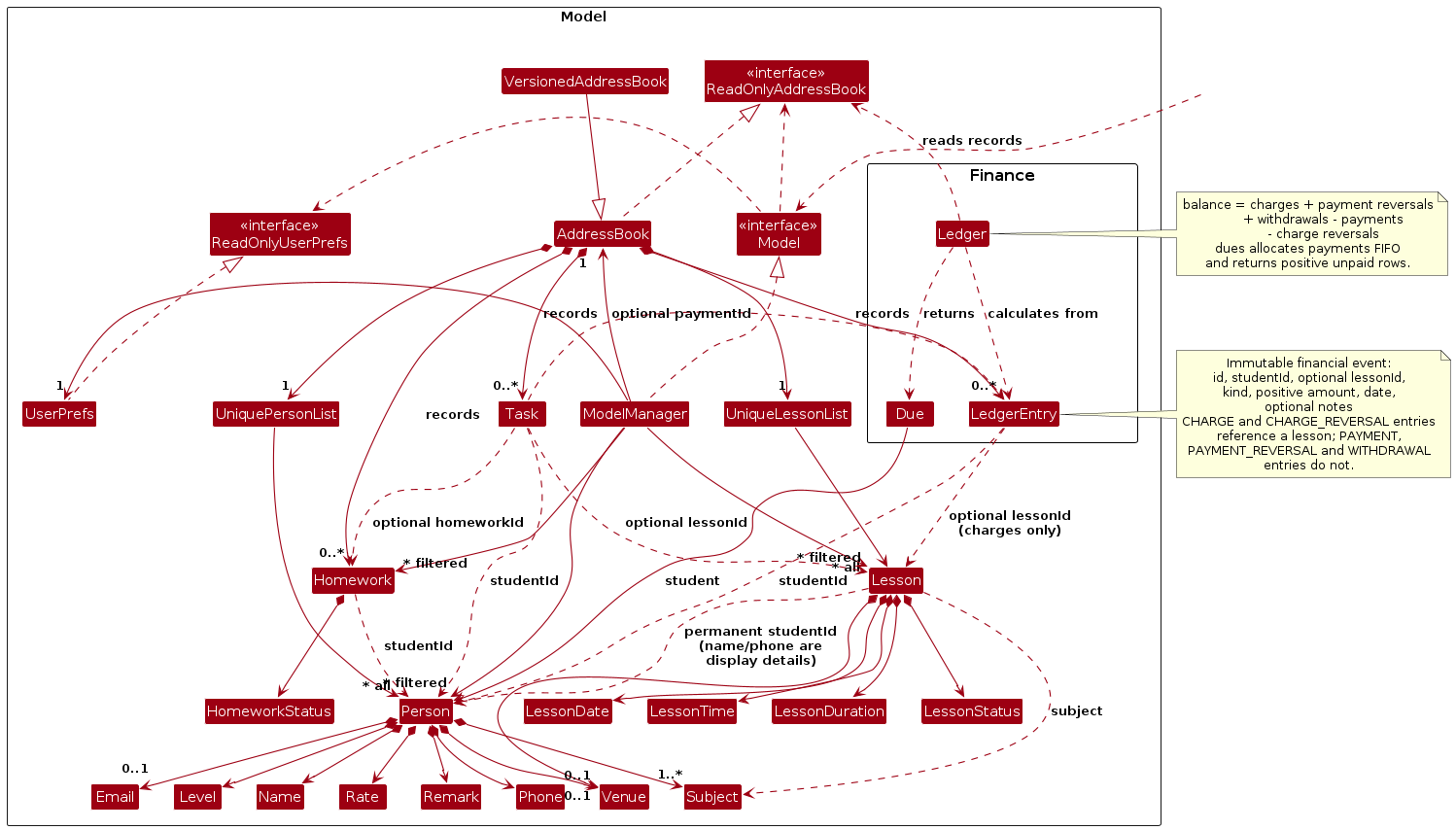
The Model component,
- stores the address book data i.e., all
Personobjects, each of which represents a student with a name, phone number, level, subjects and rate, and optionally an email, a venue and a remark (thePersonobjects are contained in aUniquePersonListobject). TwoPersonobjects are the same student if they have the same phone number and the same name, ignoring case. - stores the
Lessonobjects, each of which is a lesson with a student, a subject, a date, a start time, a duration, a status and optionally a venue (theLessonobjects are contained in aUniqueLessonListobject). ALessonrefers to its student by the permanent student UUID. Its stored name and phone number are display details and support linking older data during migration; they are not the permanent relationship key. Deleting a student deletes their lessons, and editing contact details retains the UUID link and the lesson's booking snapshots. - stores immutable
LedgerEntryrecords for lesson charges, student payments, withdrawals and the reversals of charges or payments. Each record refers to a permanent student UUID and, for charges and charge reversals, a lesson UUID; a reversal also refers to the entry it cancels.Ledgerderives balances and unpaid dues from those records; those calculations do not mutate the ledger. - stores
Homeworkitems, each for one student, andTaskfollow-ups, each linked to exactly one student, lesson, homework item or payment. It also stores the minimum travel buffer between venues and theStudentOrderchosen bysort. Dues are not stored: they are worked out from the ledger. - stores the
Personobjects selected by the current filter, such as search results, in a separate filtered list. It exposes this list as an unmodifiableObservableList<Person>that the UI can observe and bind to, so the UI updates when the list changes. - stores a
UserPrefsobject that represents the user’s preferences (currently, just the GUI settings). This is exposed to the outside as aReadOnlyUserPrefsobject. - does not depend on any of the other three components (as the
Modelrepresents data entities of the domain, they should make sense on their own without depending on other components)
Storage component
API : Storage.java
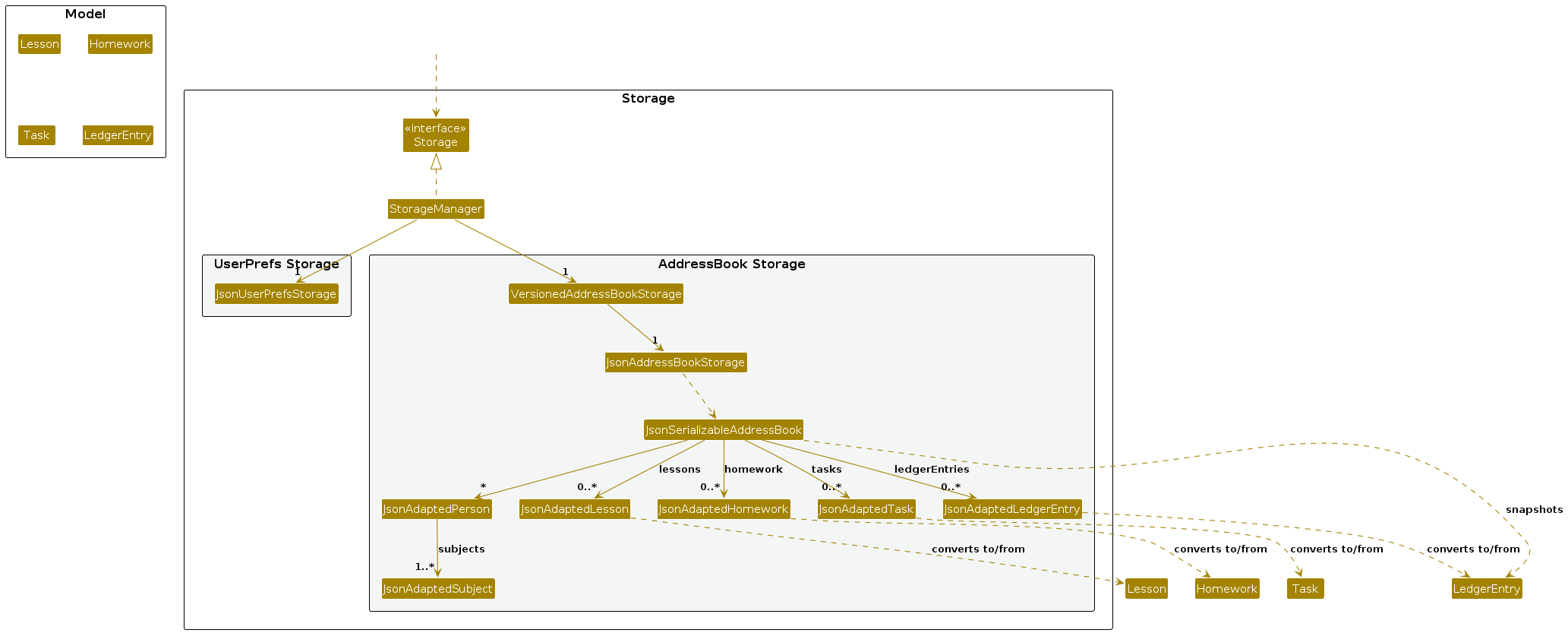
The Storage component,
- can save both address book data and user preference data in JSON format, and read them back into corresponding objects.
- is implemented by
StorageManager, which delegates the actual JSON file access toJsonAddressBookStorageandJsonUserPrefsStorage(one class per data file). - saves the students, lessons, homework, ledger entries, follow-up tasks and travel/sort settings in the same data file. A data file written before a later domain existed has no records for that domain and still loads with empty records for it.
- depends on some classes in the
Modelcomponent (because theStoragecomponent's job is to save/retrieve objects that belong to theModel)
Common classes
Classes used by multiple components are in the seedu.address.commons package.
Implementation
This section describes some noteworthy details on how certain features are implemented.
Student lookup and correction of optional values
NameContainsKeywordsPredicate normalizes names and keywords to NFC and applies the same per-code-point case
equivalence as String.equalsIgnoreCase before substring matching: toUpperCase, then toLowerCase.
This follows Person#hasIdentity, including dotless i and supplementary letters, while retaining significant
accents. It does not implement full Unicode case folding or multi-character mappings.
StudentSummaryLabels groups the full student list, including archived students, by case-insensitive name
once per textual summary. It precomputes labels by student ID, avoiding a student-list scan for each homework
row. Same-name students show only the last four phone digits. If those digits also collide, an eight-character
student-ID reference is added, falling back to the complete ID if its prefix collides. Archived status is part
of the same label. Ledger dues, HomeworkQueries, the lesson rows of today and agenda, and the view heading
use these labels independently of the current filter. A lesson whose student is not in the address book keeps the
name stored with it. This formatter is scoped to textual summaries, not contact cards or exports. Full contact
details remain in the explicit student overview, not in homework or dues rows or the startup dashboard.
EditPersonDescriptor distinguishes an omitted optional contact field from a requested clear using explicit
email and venue clear flags. The parser sets these only for an empty e/ or v/; non-empty replacements
still pass normal validation. Copies, equality and hashes retain the clear intent. EditCommand replaces the
student with the same ID, so existing lesson snapshots and linked homework, ledger and tasks are retained.
An explicitly empty homework f/ calls Homework#withoutFeedback, which returns a copy with absent feedback
and the same identity, due date and status. Clearing is also allowed after a status correction to assigned;
recording non-empty feedback still requires submission. No data-schema change is needed: absent email, venue
and feedback already use the existing optional JSON fields. Regression tests cover saving and reloading them.
Command parsing, aliases and list filters
AddressBookParser lower-cases only the command word and dispatches it through CommandInput; each
sub-command parser then reads its own first word, so LIST and LESSON ADD work without making prefixes
case-insensitive. confirm is compared with equalsIgnoreCase by the parsers that accept it.
The student command word is an alias for the student commands: student add, edit, delete, find,
view, list, archive and restore. It is routed in AddressBookParser and reaches the same command
objects as the unprefixed form, so validation and displayed-index rules are shared.
ListCommand applies the optional level, subject and archive scope in one predicate. It does not change the
saved StudentOrder; it only replaces the filtered view and renumbers the displayed students. SortCommand
chooses StudentOrder.ASCENDING or DESCENDING, and AddressBook reapplies that comparator whenever a student
is added, replaced or the whole book is reset. RemarkCommand replaces the optional remark and accepts an empty
r/ to clear it.
DemoCommand checks AddressBook#isEmpty before loading the sample data, and only after confirm. ClearCommand
clears every domain and resets the travel buffer and StudentOrder; both operations are reflected in the saved
JSON. See the User Guide for their confirmation requirements.
Offline help and command assistance
HelpCommand returns either the searchable command list or the usage text registered in its CommandHelp
entries. It never executes the command it describes. HelpWindow is a separate JavaFX stage. UserGuide loads
docs/UserGuide.md from the JAR and converts it to HTML with commonmark; GuideView then renders that HTML with
JavaFX controls and the JDK HTML parser. Heading anchors, table content and the bundled Ui.png are resolved
locally; external links are disabled, so the guide works without a network connection.
CommandAssist is the shared UI layer behind the card shortcuts. It writes command drafts into the
CommandDraftTarget implemented by CommandBox and never calls Logic. PersonCard supplies only the
displayed index and field, and the draft is cleared or replaced when the displayed list changes.
Lesson scheduling, agenda and conflict detection
The lesson commands are lesson add, lesson repeat, lesson list, lesson prep, lesson move, lesson cancel, lesson series cancel, lesson done and lesson missed. They share the lesson command word, which AddressBookParser hands to LessonCommandParser. That parser reads the next word and passes the rest of the arguments to the parser of that command. agenda is its own command word.
The sequence diagram below shows the successful changed-data path for execute("lesson move 1 d/2026-12-24"). It focuses on the Logic component; parser internals and the internal workings of Model and Storage are omitted. The command resolves the displayed index, validates and replaces the lesson, and reports overlaps without blocking the move. LogicManager then refreshes changed lesson numbers once and saves the updated data before returning success. A save failure retains the in-memory change and asks the tutor to retry save.
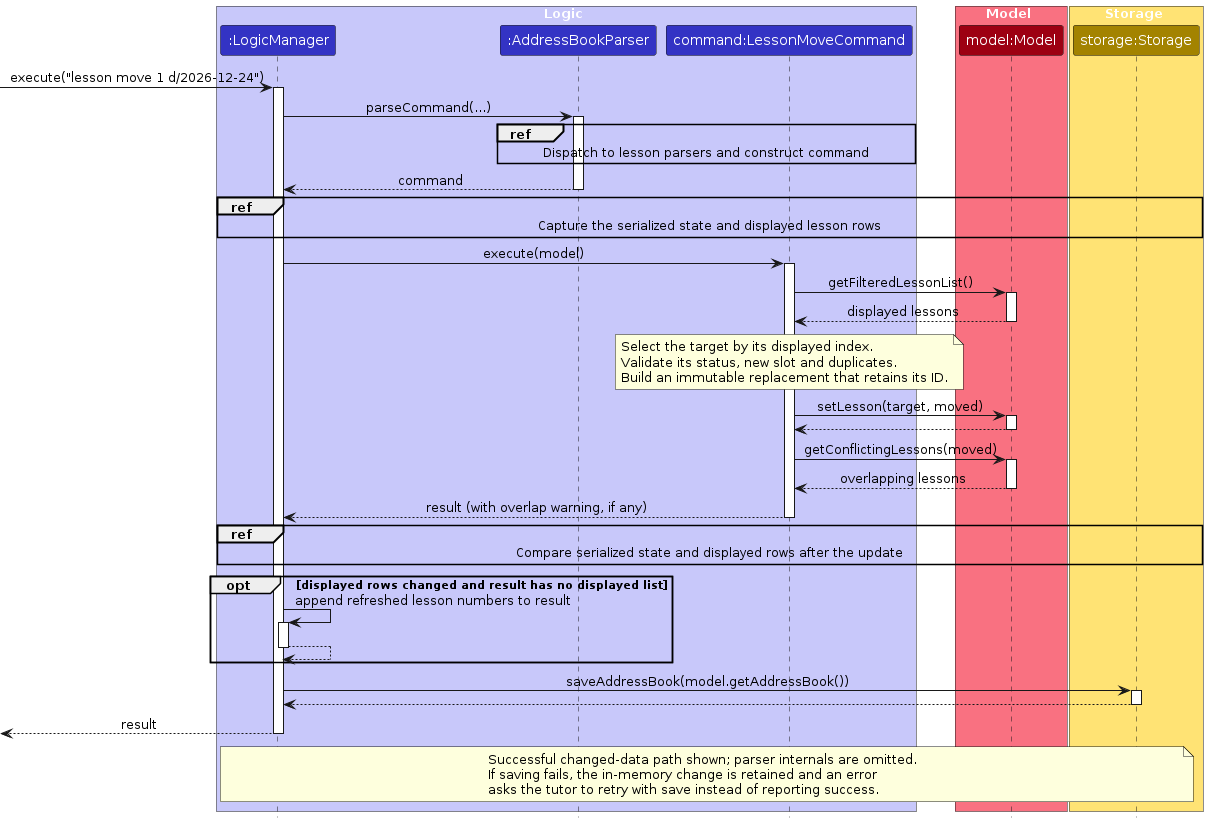
How the pieces fit together:
- Lesson indices.
Model#getFilteredLessonList()returns the lessons thatagendaorlesson listlast chose, sorted by date, then start time, then student name. Lesson mutations retain the active filter.LogicManagercompares the displayed lesson identities and rows before and after a mutation and appends the refreshed numbered list when those rows change. Commands do not append a second list;lesson addmarks its already-formatted list withCommandResult#withDisplayedLessons, so the central handler can reuse it. This prevents both stale numbers and duplicate numbering messages. - Overlaps.
Lesson#overlaps(Lesson)is true when both lessons are scheduled, are on the same date, and each starts before the other ends. It compares minutes since the start of the day, so back-to-back lessons are not an overlap and a lesson that ends at midnight can still be compared.Model#getConflictingLessons(Lesson)returns the other lessons that overlap a lesson, andlesson addandlesson moveappend the result to their message as a warning.agendamarks every lesson that has at least one overlap. - Cancelling.
Lesson#cancel(String)returns a copy with the statusCANCELLEDand the reason. The lesson is kept, so it stays in the agenda for billing, but it is no longer scheduled and so it never overlaps. - Immutability.
Lessonis immutable.lesson moveandlesson cancelbuild a changed copy and ask the model to replace the old lesson with it, in the same way thateditreplaces aPerson. - Defaults to type less.
lesson addtakes the subject from the student when the student has only one, uses 60 minutes if no duration is given, and uses the student's venue if no venue is given.
Travel buffers and series cancellation
travel buffer/MINUTES updates the buffer through Model#setTravelBuffer. The value belongs to the AddressBook, so snapshots, resets and JSON saves include it. Missing values in older files default to 30; invalid stored values reject the file rather than silently altering the setting.
TravelGap#find sorts scheduled lessons chronologically and scans groups sharing a date and start time. It retains the latest preceding end and its tied lessons, so a short lesson nested inside a longer lesson cannot produce a misleading departure time. It uses minutes since midnight, avoiding wraparound at 00:00. Different dates and non-scheduled lessons are excluded. The command layer formats the returned gaps with the shared MESSAGE_TRAVEL_WARNING, including both student names, without changing lesson filters or blocking bookings. AgendaCommand, TodayCommand, LessonAddCommand and LessonMoveCommand use the same calculation. Add and move report only journeys into or out of the changed lesson; agenda and today restrict destinations to their displayed dates. Today's warnings use the same two-space indentation as its lesson rows.
lesson series cancel LESSON_INDEX confirm requires exact confirmation before resolving the occurrence in the displayed list. The optional UUID returned by Lesson#getSeriesId identifies its series independently of dates, and is retained by rescheduling, status updates, preparation updates and student edits. The command selects only scheduled occurrences whose date and time are not before its injected clock, builds all cancellations in an AddressBook copy, then replaces the model data once. The cancellation reason is Series cancelled; historical records and permanent IDs are retained. The series ID is an optional JSON field, so older lessons still load without being assigned to an invented series.
LessonRepeatCommand creates one UUID and attaches it to every occurrence using Lesson#withSeries(UUID). Lesson#getSeriesId returns that optional UUID; JsonAdaptedLesson uses the same optional seriesId JSON field as recurring bookings. After adding the series, the command reports each travel gap involving a new occurrence once, including journeys into and out of it. Weekly agenda warnings are formatted inside the day loop, immediately after that day's lesson rows.
Move, single cancellation and series cancellation use LessonCommandUtil#requireNotCharged to retain billed history. Series cancellation validates every affected occurrence before building its replacement, so a charge on even the last eligible occurrence leaves all bookings and ledger records unchanged. Cancellation is a status change, not a deletion or clear, so it is outside the one-action undo scope described below and is not undoable.
TravelGapTest, TravelCommandParserTest, LessonSeriesCancelCommandTest and LessonTravelWorkflowTest cover buffer boundaries, venue exceptions, latest-end selection, moved occurrences, confirmation, filtered numbering, failed-save retries and JSON restarts.
Design considerations
Aspect: how a lesson refers to its student
- Alternative 1 (current choice): store the permanent student UUID, with name/phone display details and booking-time snapshots in the lesson.
- Pros: Profile edits do not change the relationship key. Immutable lesson copies and JSON round trips preserve the same identity, and booking-time level and venue remain available for history.
- Cons: Loading must validate the student link and migrate older lessons that have no student UUID.
AddressBookmaintains display details and handles cascade deletion centrally.
- Alternative 2 (former design): identify the student solely by the stored name and phone number.
- Pros: The older file needs no separate student identifier.
- Cons: Contact edits change the relationship key and require every linked record to be repaired. A stable UUID avoids relying on mutable contact values for identity.
Aspect: what to do when lessons overlap
- Alternative 1 (current choice): warn, but still schedule or move the lesson.
- Pros: A tutor may double book on purpose, for example for a make-up lesson or two siblings. Blocking would force the tutor to delete a real lesson to record another.
- Cons: A warning in the result box is easy to miss, so
agendaalso marks overlapping lessons.
- Alternative 2: reject the lesson.
- Pros: No overlaps can exist.
- Cons: This is overzealous validation and has no workaround.
Reading dates
Every date typed by the user is read by ParserUtil.parseDate, which resolves today and tmr against the injected clock and gives anything else to the LessonDate constructor. LessonDate hands the text to FlexibleDateParser, which splits it into three parts with the same separator (/, -, . or a space) between them and reads the parts as day, month and year, or as year, month and day. The month is one or two digits or an English month name, and the year is four digits or two digits for 2000 to 2099. Dates saved in the data file are always YYYY-MM-DD, written by LessonDate#toStorageString, and JsonAdaptedLesson only accepts that format when loading.
A date with a four-digit year has one reading. When the first and the last part both have at most two digits, as in 26-12-22, FlexibleDateParser reads the day first (26 December 2022). It reads the year first only if the day-first reading is not a real date, as in 35-12-31. The reading never depends on today's date.
Design considerations
Alternative 1 (current choice): read a date with two short end parts day first, and use the year-first reading only if that day does not exist.
- Pros: one rule, matching how dates are usually written in Singapore, and the same text always means the same date. It still accepts
35-12-31as 31 December 2035. - Cons: a year-first form such as
26-12-22means 26 December 2022. The User Guide says to write a year-first date with four digits.
Alternative 2: take the reading nearer to today.
- Pros:
26-12-22typed in 2026 is 22 December 2026. - Cons: it silently misreads ordinary day-first dates such as
26/11/27and changes its result with the computer's date.
Alternative 3: refuse a date that can be read two ways, as 9/10 is refused.
- Pros: never misreads a date.
- Cons: most two-digit dates in the next few years would be refused, because they can be read both ways.
Lesson completion and teaching notes
lesson done INDEX [n/NOTES] is routed through LessonCommandParser to LessonDoneCommandParser. The parser validates the lesson index, rejects repeated n/ prefixes and uses ParserUtil#parseNotes to normalise and validate optional notes. Lesson validates notes again at the model boundary, and JsonAdaptedLesson rejects invalid saved notes with an IllegalValueException.
LessonDoneCommand uses the current filtered lesson list, rejects cancelled lessons and dates after the local current date, then replaces the lesson with the immutable copy returned by Lesson#complete. A Clock can be injected into the command to test date boundaries without changing the system clock. Completing a lesson does not reset the active filter, so it can disappear from an upcoming-only list; lesson list st/INDEX all/ includes completed lessons for later note corrections.
When notes are supplied again on a completed lesson, they replace the existing notes without creating another lesson. Omitting notes preserves them. The existing LogicManager save path persists the status and notes before returning success, and view includes these notes and the completed-lesson count.
Missed lessons
lesson missed INDEX is routed through LessonCommandParser to LessonMissedCommandParser. It accepts only a positive lesson index, with no extra parameters. LessonMissedCommand resolves this index against the current filtered lesson list, rejects cancelled and completed lessons, and checks that the date is not later than the local current date. Like the completion command, it accepts an injected Clock for deterministic date-boundary tests.
The command replaces a scheduled lesson with the immutable copy returned by Lesson#miss, which retains all booking details, notes and identity fields. Repeating it on an already-missed lesson returns an informative message without replacing the record. Existing lesson filters, overlap checks, view history counts and JSON storage already support LessonStatus.MISSED; no new storage format is needed. A missed lesson can disappear from an upcoming-only filter, but remains accessible with lesson list st/INDEX all/. The existing lesson done command can correct a missed status to completed. lesson move rejects a missed lesson, because the moved copy would keep MISSED on its new date and the record of the missed slot would be lost. A make-up lesson is scheduled with lesson add instead.
LessonMissedIntegrationTest exercises command parsing, status changes, student history and JSON reload together. It also verifies that invalid arguments, invalid indices and rejected status/date changes leave the saved file unchanged.
Lesson preparation
lesson prep INDEX n/NOTES is routed through LessonCommandParser to LessonPrepCommandParser. The parser
requires one displayed lesson index and one non-empty n/ value, uses the shared printable-notes policy, and
rejects duplicate or empty prefixes. LessonPrepCommand replaces the preparation through Lesson#prepare,
which returns an immutable copy and preserves the lesson's status, teaching notes, student snapshot and series
identity.
Preparation works for a lesson in any status and does not complete or reclassify it. It appears in lesson list
and in the next-lesson section of view; it cannot be cleared in this version. Repeating the command replaces the
stored text. Because preparation does not change lesson ordering, it does not renumber the displayed list.
Weekly lesson series and back-dated lessons
lesson repeat and the past/ flag of lesson add are routed through LessonCommandParser like the other lesson commands. LessonRepeatCommandParser tokenises the lesson prefixes together with count/ and every/, and also tokenises past/ so that it can reject it with a clear message, because a series starts today or later. It reads count/ and every/ with one pattern check, at most 3 digits, before parsing, so a huge or non-numeric value is rejected as a range error and cannot overflow.
The sequence diagram below shows execute("lesson repeat st/3 d/2026-12-03 t/16:00 count/4"). The parser creates the command, and the command then builds the four lessons, checks every one of them for duplicates and overlaps, and only then adds them to the model.
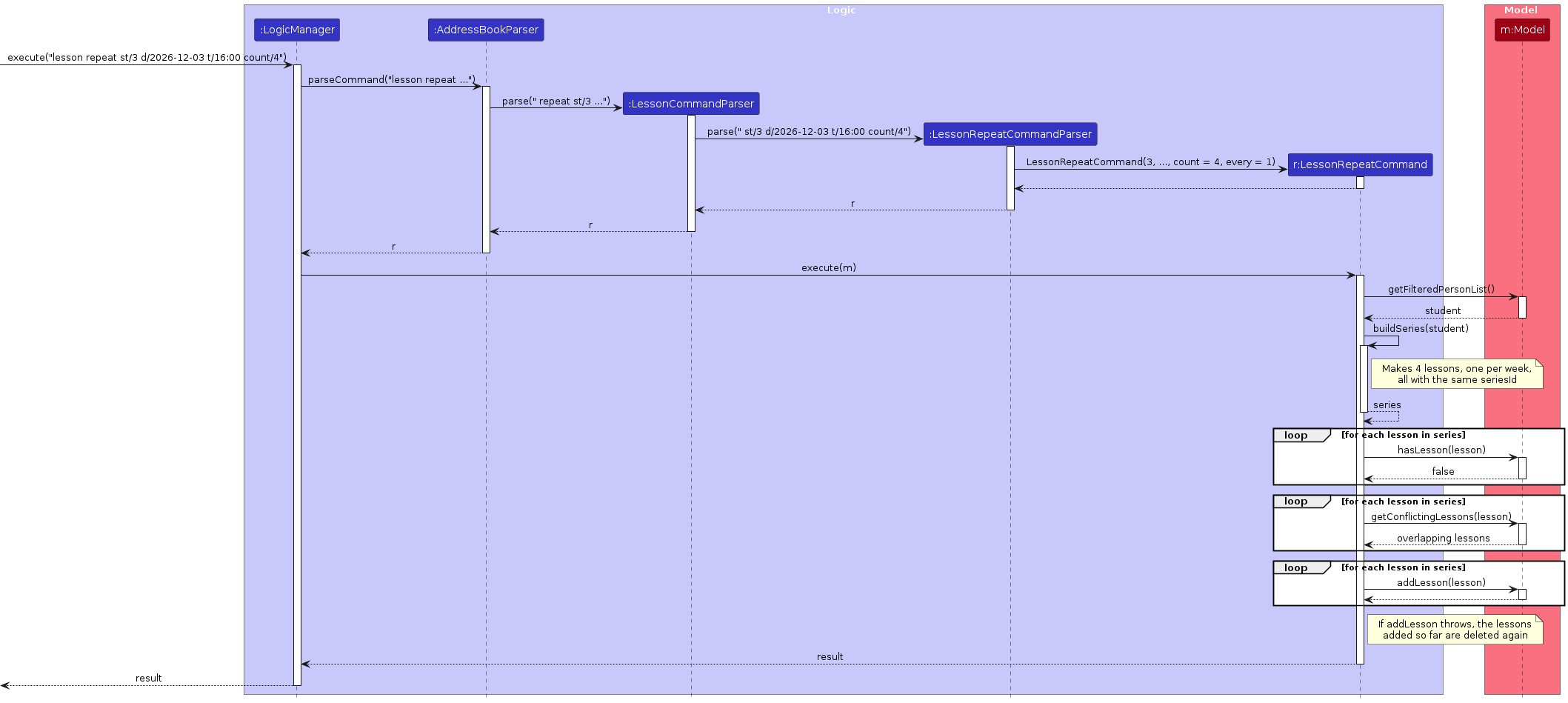
LessonRepeatCommand builds every occurrence first, one per week (or every every/ weeks) from the start date, and each is a normal Lesson made with snapshotStudent, so it records the student's id and academic level as lesson add does. All occurrences share one seriesId. The command then checks every occurrence against the existing lessons, and adds none of them if any is a duplicate. The adding itself is wrapped so that, if the model throws part-way, the occurrences added so far are deleted again. This makes the series all or nothing. An overlapping occurrence only produces a warning, which is listed for up to three occurrences and then summarised in one line. The command reports whether the displayed lesson list renumbered by comparing the displayed lessons before and after, not by guessing from the size of the list.
The series id. Lesson has an optional seriesId (a UUID, null when the lesson is not part of a series). It is copied by every method that returns a changed copy (reschedule, cancel, complete, miss, prepare, withStudent, snapshotStudent), so an occurrence stays in its series when it is moved or its status changes, and a later series cancel command can find every occurrence. JsonAdaptedLesson saves it as an optional field, so a data file written before series existed still loads. A seriesId that is present but is not a valid UUID, including a blank one, is rejected with Lesson's seriesId is not a valid ID.
Dates. LessonCommandUtil holds the date and subject checks that lesson add, lesson repeat and lesson move share: requireNotInPast, requireNotAfterToday, requireNotTooFarPast, requireNearFuture and chooseSubject. The date checks have a version that takes a Clock, and LessonAddCommand and LessonRepeatCommand have a constructor that takes one, in the same way as LessonDoneCommand, so that the boundaries (today, two years ahead and two years back) can be tested with a fixed date. With past/, a date after today is rejected, so that past/ cannot create a scheduled lesson that lesson done would refuse.
Travel warnings. After scheduling, the shared travel-gap calculation reports journeys into or out of the new occurrences without blocking them. It excludes unrelated journeys and emits each affected journey once.
LessonRepeatCommandTest, LessonRepeatCommandParserTest and SeriesIntegrationTest cover the series rules, the all-or-nothing behaviour, moving and cancelling an occurrence, and saving and reloading a series.
Design considerations
Aspect: how to make a series all or nothing
- Alternative 1 (current choice): check every occurrence first, then add them and delete the added ones again if adding fails.
- Pros: No partial series is ever visible to the tutor, and the check catches every duplicate before anything changes.
- Cons: The rollback is written by hand in the command, because the model has no transaction.
- Alternative 2: add the occurrences one by one and stop at the first failure.
- Pros: Simpler.
- Cons: A tutor could be left with half a series and have to find and delete it.
Dashboard and student overview
today shows the dashboard, which answers "what does today require?", and view INDEX shows the overview of one student. Both are read-only commands that return their whole result as text for the result box.
Parsing. today takes no parameters, so AddressBookParser calls requireNoArguments before it creates the command: today 2 fails with The 'today' command takes no parameters. instead of running. AddressBookParser passes LocalDate.now(clock) to TodayCommand, and ViewCommandParser passes it to ViewCommand with the parsed index. The commands do not read the clock themselves, so tests can give them a fixed date.
Building the dashboard. TodayCommand#execute gets the lessons from Model#getAddressBook() and returns the date followed by four sections, in this order:
TODAY'S LESSONS: the lessons on that date that are not cancelled, in time order, with their count and total time in the heading. A completed or missed lesson shows its status. For each lesson,Model#getConflictingLessons(Lesson)decides whether to add the⚠ overlapsmarker thatagendauses.LESSONS AWAITING NOTES: the scheduled lessons from earlier days, most recent first.OVERDUE HOMEWORK:HomeworkQueries#summary(book, null, true, today)selects every student's assigned homework that was due before today. It writes each item ashw listdoes, but without numbers, so the homework numbers thathw listshowed still apply.DUES:Ledger.formatDues(book, today)gives the students who owe money, oldest unpaid charge first, followed by the total. The dashboard prepends theDUESheading when the ledger has no debtors.
A section with nothing to show gives its own empty state, such as No lessons today., instead of disappearing.
The sequence diagram below shows execute("today"). For simplicity, it leaves out the calls inside HomeworkQueries#summary and two checks that run for every command, on the input and on the displayed lesson numbers.
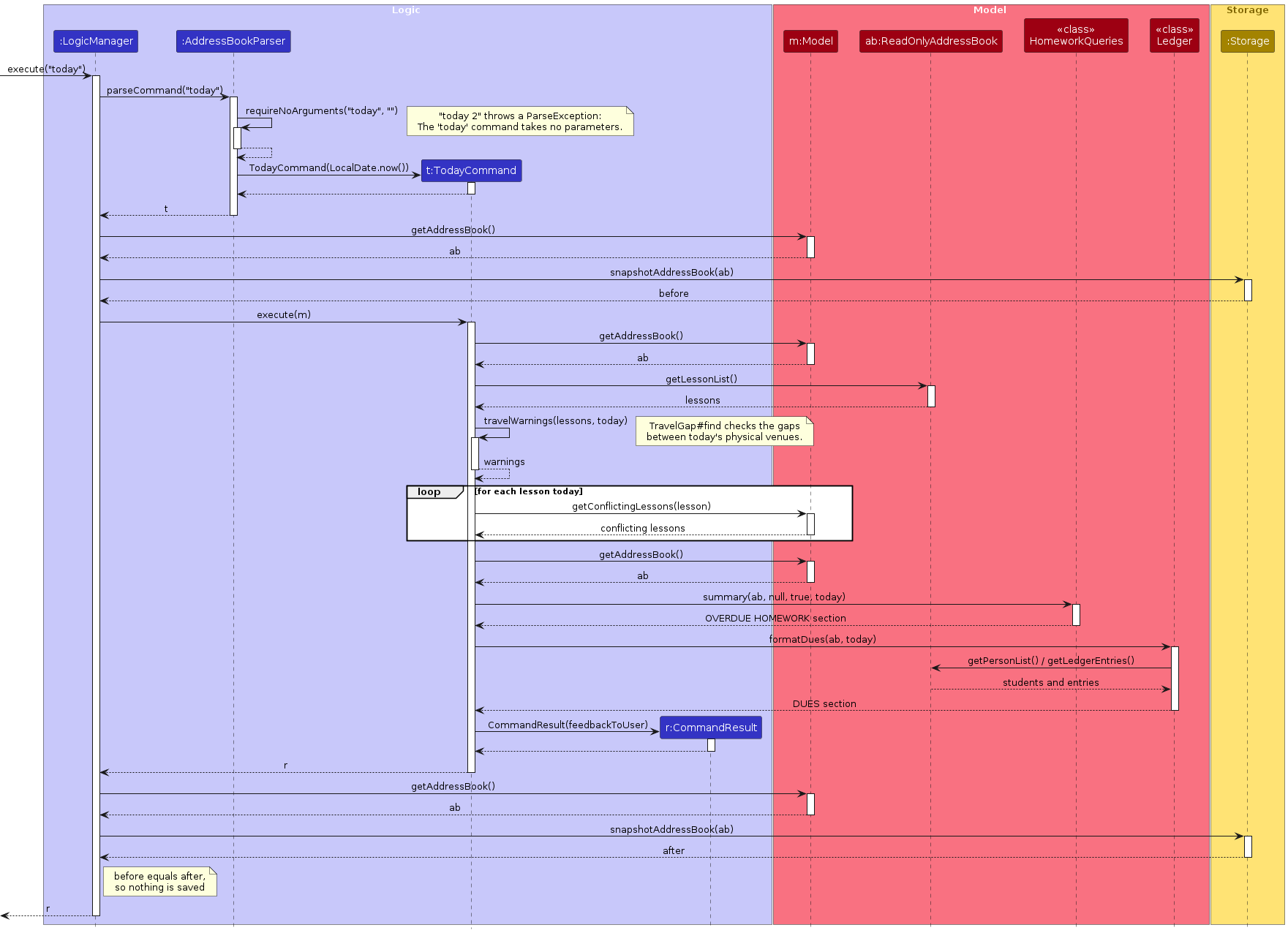
Read-only. today calls only query methods, so it changes neither the data nor the displayed lists. Before and after every command, LogicManager calls Storage#snapshotAddressBook, which turns the data into the JSON text that a save would write, without writing the file. For today the two snapshots are equal, so nothing is saved. The dashboard shows the data as it was when the command ran. The next command replaces it in the result box, and the tutor runs today again to see it up to date.
At start-up. MainWindow#fillInnerParts puts Logic#getStartupMessage() in the result box. LogicManager#getStartupMessage() returns the start-up warning, if there is one (the first-run welcome, a data file that could not be read, or a migration that could not be saved), followed by getDashboard(), which executes a new TodayCommand directly on the model, without the parser or the snapshots.
Student overview. ViewCommand#execute takes the student at INDEX in the displayed student list, and that student's lessons from the address book in time order. It returns six sections, in this order:
- the student's details:
Viewing:with the name, then the level, subjects, rate, contact details and any remark NEXT LESSON: the first scheduled lesson from today onwards, with any preparation notesRECENT LESSON NOTES: the three most recent notes of completed lessons, newest firstLESSON HISTORY: the numbers of completed, cancelled and missed lessonsBALANCE:Ledger.describeBalance(Ledger.balance(book, student))OUTSTANDING HOMEWORK:HomeworkQueries#summary(book, studentId, false, today)selects the student's homework that is not yet reviewed, overdue first
Like the dashboard, the overview gives an empty state for a section with nothing to show. It does not change the displayed student list, so the numbers used by other commands stay the same.
Travel warnings for the lessons shown are included after TODAY'S LESSONS. The dashboard and overview remain read-only: each section is a query on the address book whose text is added at its position in the order.
Design considerations
Aspect: where the text of the dashboard is built
- Alternative 1 (current choice): the command builds its own text, and takes the homework section from
HomeworkQueries, a shared query class in the model whose selection and formatting rulesviewandhw listalso use.- Pros: The order of the sections is in one place:
TodayCommand#executejoins them in the order they are shown.today,viewandhw listshare the homework rules, so they cannot drift apart. - Cons: The result is a single string. Another display, such as a panel beside the student list, would need the sections as data instead.
- Pros: The order of the sections is in one place:
- Alternative 2: a separate dashboard class that collects a section from each feature.
- Pros: A new feature adds its section without editing
TodayCommand. - Cons: The sections and their order are fixed, so for a few sections the extra class adds indirection without removing code.
- Pros: A new feature adds its section without editing
Follow-up tasks
A follow-up task is a short reminder, with an optional due date, that is about a student and,
optionally, one of that student's lessons, homework items or payments. The task commands (add, list, edit, done,
delete) live in logic/commands/Task*Command and logic/parser/Task*CommandParser.
Model. Task (in model/task) is immutable and holds a task id, a description (at most 200 printable
characters), an optional due date, a done flag and its links: studentId (always present), and at most one of
lessonId, homeworkId or paymentId. All four links are the permanent UUIDs of Person, Lesson, Homework and
LedgerEntry. A task never copies a name, phone number, lesson slot or amount, so editing or renaming a student,
moving, cancelling or rebooking a lesson, editing homework and reversing a payment never changes what a task is about.
This matters because TutorFlow lets a cancelled lesson and a new booking share the same slot: only the lesson UUID
tells them apart. Task#isAbout(Person | Lesson | Homework | LedgerEntry) is a plain UUID comparison. AddressBook
owns the list of tasks (task ids are unique) and exposes addTask, findTask, setTask and
removeTask.
Cascade rules. AddressBook is the only place that deletes tasks, so a task cannot be orphaned by a command:
| Record removed | Tasks removed |
|---|---|
Student (delete) | every task about the student, including those linked to the student's lessons, homework or payments |
Lesson (Model#deleteLesson; a series rollback also uses it) | only tasks whose lessonId is that lesson. A rebooking in the same slot is a different lesson and keeps its tasks |
Homework (hw delete) | only tasks whose homeworkId is that item |
clear confirm | all tasks |
Edits (edit, archiving a student, lesson move, lesson cancel, hw edit, pay reverse) leave tasks untouched,
because the UUIDs do not change. delete INDEX counts the linked tasks in its confirmation prompt, using the same list
of linked-record counts as lessons, so a later feature adds one more count instead of a new message.
Design considerations
Aspect: how a task stays attached to what it describes
- Alternative 1 (current choice): store the permanent UUID of the parent record.
- Pros: Renames, reschedules and reversals do not detach the task, and a cancelled lesson cannot be confused with a new booking in the same slot.
- Cons: Loading must validate every parent link and skip stale tasks when a parent has already been deleted.
- Alternative 2: store a displayed index or a copied name and slot.
- Pros: The task is easy to display without another lookup.
- Cons: Renumbering, filtering or editing the parent can silently change what the task means.
Storage. Tasks are saved in an optional top-level tasks array of JsonAdaptedTask, beside persons, lessons,
homework and ledgerEntries. A file without tasks (schema 16 or older) loads with no tasks. Adding the array
bumped StorageSchema.CURRENT_VERSION to 17; task payment links then bumped it to 18 and withdrawals to 19, so
older builds refuse a newer file rather than loading it without those fields and then deleting them on the next save.
{
  "tasks": [
    {
      "id": "6f1c9d52-0f6e-4c0e-9c0a-1f2f4a1f7b11",
      "description": "Send past paper to parent",
      "due": "2026-11-02",
      "done": false,
      "studentId": "0d1a1d0e-3c52-4a52-8b4e-6b6e5f3b7a10",
      "lessonId": "b2d0f0f3-6b34-4a27-9f6a-3f1f2f6d9c21"
    }
  ]
}
done, due, lessonId, homeworkId and paymentId may be omitted. JsonSerializableAddressBook#toModelType
rejects the data file as invalid if a task id is duplicated, a link is not a UUID, or a task has more than one lesson,
homework or payment link. A task whose link does not resolve (the student, lesson, homework or payment is missing,
or a linked record belongs to another student) is stale: it is skipped and logged, without its text, instead of
rejecting the whole file, because AddressBook already deletes the tasks of a record that is deleted. Tasks from an earlier development build that
stored a student name and phone instead of ids are not migrated.
Selection by index. task add lesson/N, hw/N and pay/N use the numbering of the last lesson list/agenda,
hw list and pay list, exactly like the lesson, homework and payment commands, and store the UUID of the row that
was shown. task list numbers the tasks it displays, and task edit|done|delete N use that numbering.
Undo. task delete participates in the single-action undo described under Undo of the latest deletion or clear. The other task commands are not destructive actions and do not create an undo point.
Homework status and deletion
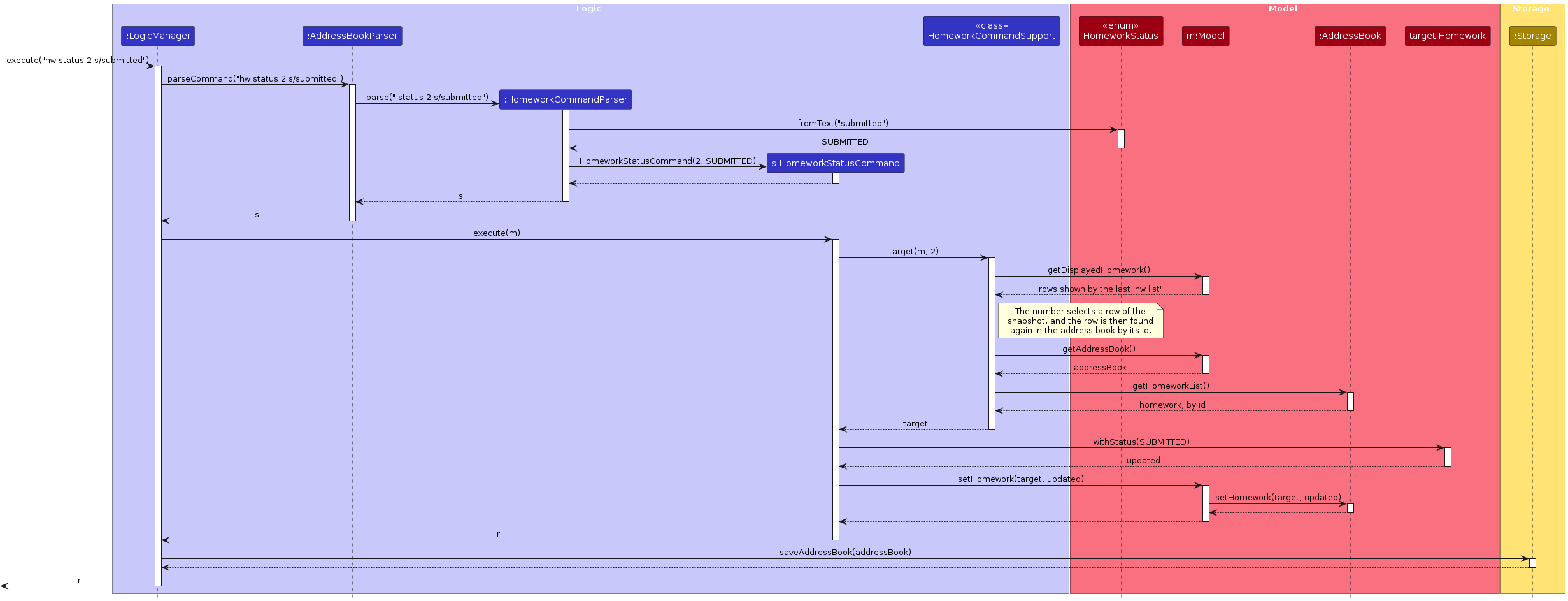
Homework commands take a number from the last hw list. HomeworkCommandSupport#target resolves that number against the snapshot that Model#getDisplayedHomework() returns, and then finds the item again in the address book by its id, so a number never selects another item.
The sequence diagram below shows execute("hw status 2 s/submitted").
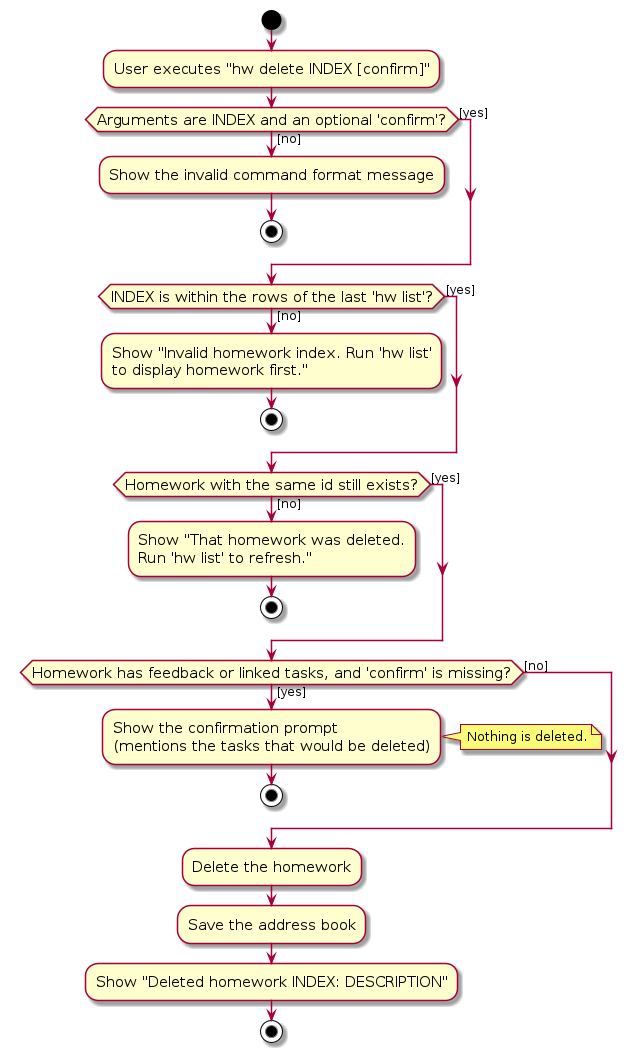
The activity diagram below shows what hw delete INDEX [confirm] does. Homework that has feedback or linked follow-up tasks is only deleted when confirm is given.
Design considerations: homework numbering
Aspect: how a deleted homework number is handled
- Alternative 1 (current choice): keep the numbered snapshot until the next
hw list.- Pros: A number always means the row the tutor saw, and a deleted row reports that it is gone instead of silently selecting another assignment.
- Cons: The tutor must run
hw listafter a deletion to get a compact, current numbering.
- Alternative 2: remove the row and renumber immediately.
- Pros: The next command sees a compact list without another listing command.
- Cons: A pending number can silently point at a different assignment after deletion.
Archiving and deleting students
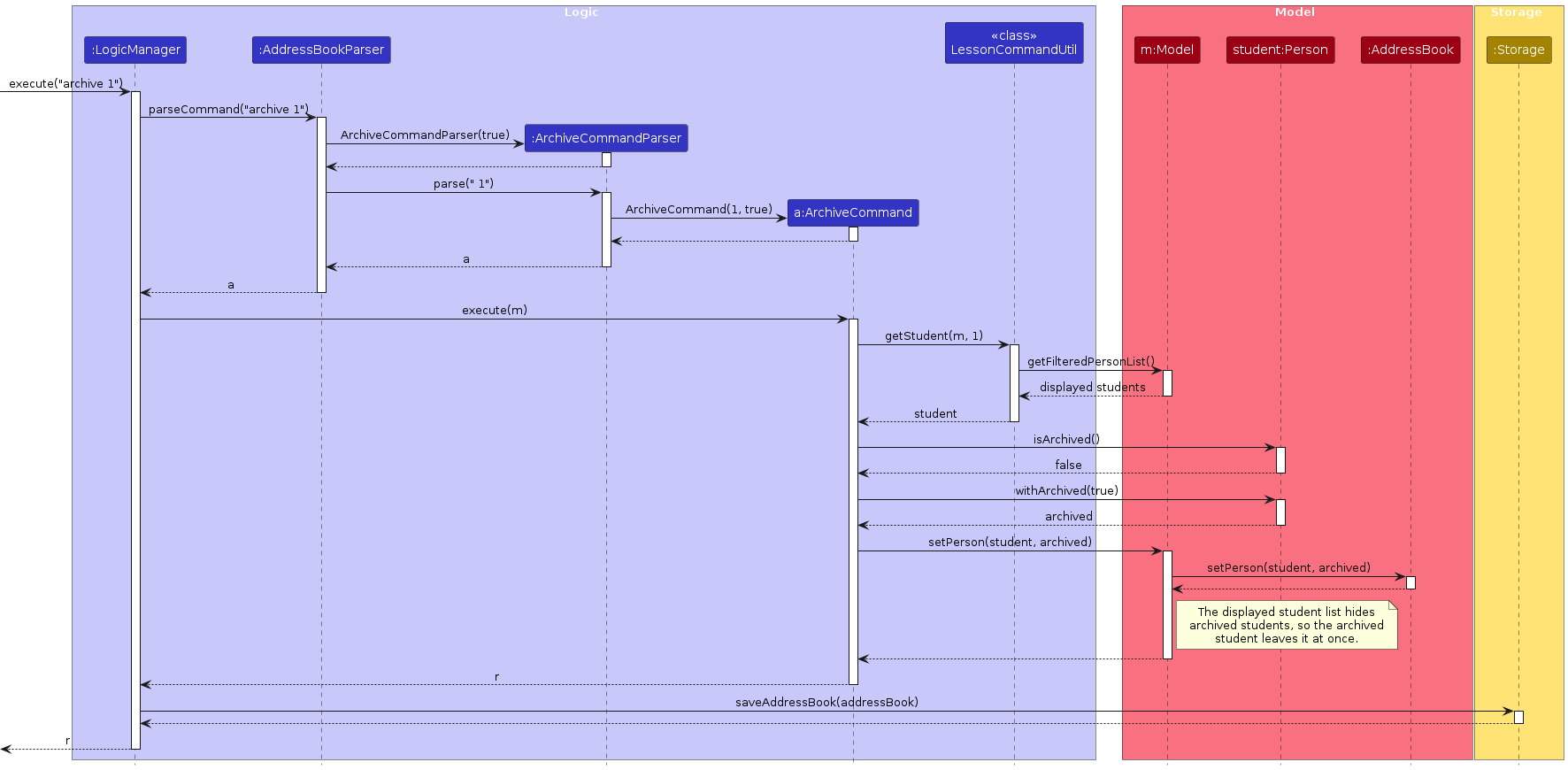
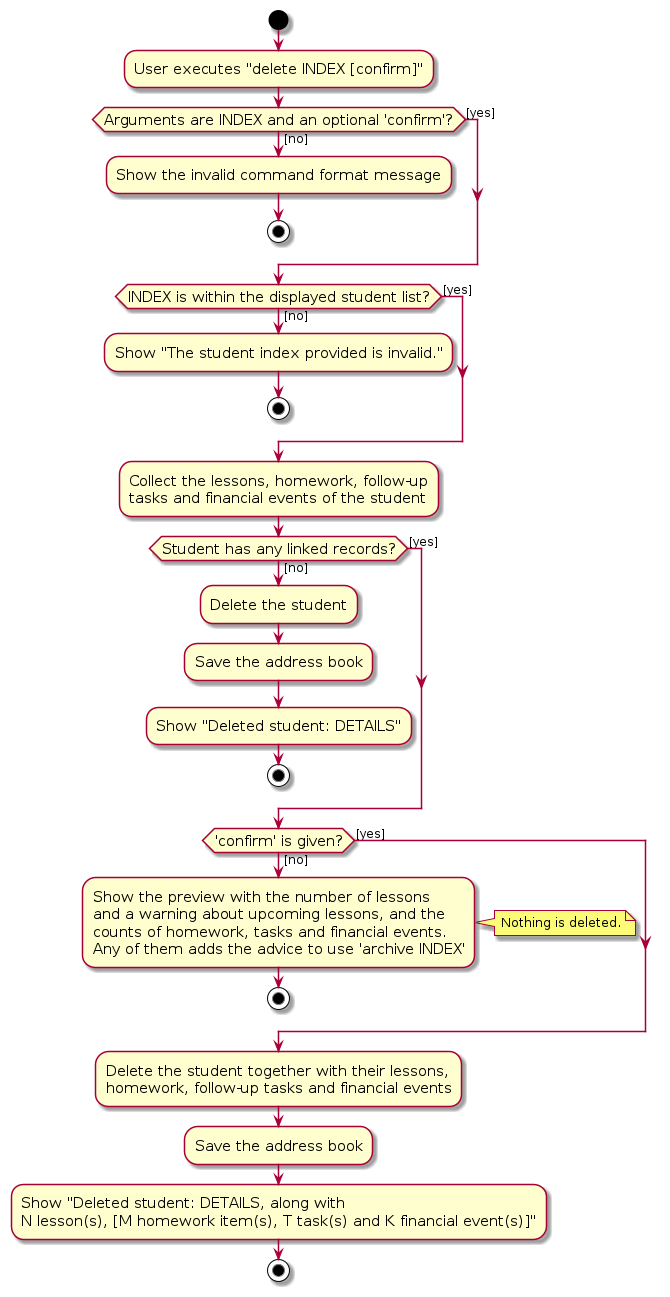
archive INDEX and restore INDEX replace a student with a copy whose archived flag is changed, so the lessons and homework of the student are kept. The default student list hides archived students. delete INDEX removes a student together with their lessons, homework, financial events and follow-up tasks, and asks for confirm first when the student has any.
The sequence diagram below shows execute("archive 1").
The activity diagram below shows what delete INDEX [confirm] does.
Design considerations: student history
Aspect: what to do with a student who has history
- Alternative 1 (current choice): keep archive and delete as separate actions, and require
confirmfor a destructive delete.- Pros: The tutor can stop teaching a student without losing lessons, homework or financial history, while a deliberate delete still removes the records the tutor asked to remove.
- Cons: A student with old records cannot be deleted in one unconfirmed command.
- Alternative 2: make delete always remove the student and all history immediately.
- Pros: Fewer steps.
- Cons: An accidental deletion loses the financial and teaching record, with no confirmation or archive alternative.
Undo of the latest deletion or clear
Undo is deliberately a single-action, session-only safety net, not a general undo history. It restores the whole address book from immediately before the latest successful delete, hw delete, task delete or clear confirm. It does not undo lesson cancellations, edits, payments or other commands.
VersionedAddressBook extends AddressBook with three pieces of state:
transitionStateis a snapshot taken before a destructive command runs.lastStateis the snapshot promoted fromtransitionStateonly after that command succeeds.lastDestructiveActionis the message fragment used byUndoCommand.
LogicManager calls Model#beforeCommand(boolean) before command execution and Model#afterCommand(String, boolean) in its finally path. The first boolean tells the model whether the parsed command extends DestructiveCommand; the description comes from DestructiveCommand#getDestructDescription(). The second boolean is true only when the command succeeded and the serialized state changed, so a failed command or a no-op clears transitionState without promoting a new undo point.
UndoCommand calls Model#undoDestructiveAction(), which restores lastState through resetData. The LogicManager then saves the restored state through the normal changed-data path. A save failure retains the restored in-memory state so save can retry, matching every other mutating command.
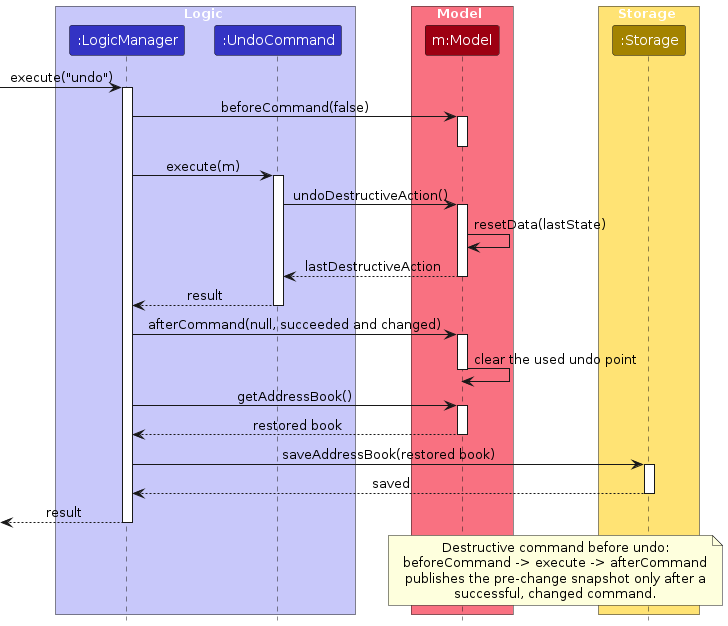
Only one undo point is retained. A successful non-destructive command clears it in afterCommand, as does a successful destructive command replacing it. This is intentional: undo must never silently roll back later work. Read-only commands do not clear it. The state is not persisted, so closing TutorFlow ends the undo opportunity.
VersionedAddressBookTest exercises the hooks and failed-destructive path directly. UndoCommandTest and UndoIntegrationTest cover the command and persistence behaviour. Keep afterCommand in the finally path: it must run on failure so that a rejected confirmation discards the temporary transition snapshot without consuming a valid undo point.
Design considerations: undo scope
Aspect: how much history undo should retain
- Alternative 1 (current choice): retain one destructive-action undo point for the current session.
- Pros: Undo is predictable and cannot silently roll back later edits, while the saved state remains the normal source of truth.
- Cons: A second destructive action replaces the first undo point, and closing the app ends the opportunity.
- Alternative 2: keep a full undo history across sessions.
- Pros: Any number of destructive actions can be reversed later.
- Cons: The file grows, later changes complicate what a stored undo point means, and the behaviour is much harder to explain and test.
Student balances and dues
Ledger records and balance arithmetic
LedgerEntry is immutable and records its UUID, permanent student UUID, optional lesson UUID, kind,
positive exact BigDecimal amount, date and notes. There are five kinds. CHARGE and CHARGE_REVERSAL require a lesson UUID; PAYMENT, PAYMENT_REVERSAL and WITHDRAWAL have none. A reversal also records the UUID of the entry it cancels (reverses), has the same student, lesson and amount as that entry, and can be added only once per entry. Entries are never deleted: charge reverse adds a CHARGE_REVERSAL.
AddressBook owns the unmodifiable list and validates student/lesson references, unique entry IDs,
and at most one active (not reversed) charge per lesson. Profile edits never rewrite financial records. Copy/reset,
equality, student deletion, clear, and the real JSON snapshot include both finance and homework.
LessonDoneCommand explicitly calls Model.chargeLesson(target, completedLesson) on first completion.
This operation validates the charge, replaces the lesson and records the charge atomically, returning
Optional<LedgerEntry> for the command's success text. A zero rounded fee returns no charge. The general
setLesson operation only updates lesson data; it never bills implicitly. Existing completed notes
use setLesson, so note corrections do not bill again. Fees use the current hourly rate × duration
in minutes ÷ 60, rounded once with RoundingMode.HALF_UP, and retain the permanent lesson UUID.
The command translates model validation failures to CommandException and gives an accurate zero-fee
message; charge l/INDEX amt/AMOUNT can then bill the lesson by hand.
Ledger copy/reset and JSON restoration validate records in one pass using student/lesson maps and
sets of entry IDs and charged lesson IDs. The ledger validation cost is O(students + lessons + entries),
rather than scanning the growing list once per entry. Other domains keep their existing uniqueness checks.
getLedgerEntries returns one cached immutable live wrapper. Individual insertions remain validated.
removeLesson refuses to delete a billed lesson, including detached equal-value lookup, so a saved
charge cannot point at a deleted lesson. Student deletion still cascades all of that student's history.
Ledger.balance(book, student) adds charges, payment reversals and withdrawals and subtracts payments and charge reversals, returning a negative value for credit. Ledger.activeCharge(book, lessonId) returns the charge of a lesson that no reversal cancels; the lesson move/cancel guard and the one-charge-per-lesson rule use it. ChargeCommand records a manual charge or a reversal. PaymentListCommand lists PAYMENT entries oldest first, and stores them with Model#setShownPayments. It builds a student-name map and the set from Ledger.reversedIds once per listing, so listing stays linear in the number of entries instead of scanning the ledger for every row; PaymentReverseCommand takes its index from that stored list (like task list and the task commands), so the numbers stay fixed until the next pay list. It refuses a payment that is gone from the ledger or that Ledger.isReversed finds already cancelled, and otherwise adds LedgerEntry.reversalOf(payment, today). PayCommandParser routes pay list and pay reverse to their parsers and everything else to PaymentCommandParser. WithdrawCommand records an append-only WITHDRAWAL against available credit and refuses amounts above it. The automatic charge raised by lesson done keeps the lesson's UUID as its entry ID, so a charge raised again after a reversal gets a random ID; a charge made with charge always gets a random ID. AddressBook#chargeLesson raises no automatic charge when Ledger.activeCharge already finds one, so completing a missed lesson that was billed by hand does not bill it twice.
Ledger.describeBalance(amount) shares the OUTSTANDING $X.XX / IN CREDIT $X.XX labels.
Ledger.dues(book, today) returns immutable Due(student, amount, oldestUnpaidDate) rows, oldest first,
breaking ties by name then phone. Payments cover charges FIFO by charge date, including partial payments
and advance credit. The supplied date is the reference for displaying unpaid ages, not a cutoff that
excludes transactions. Ledger.formatDues(book, today) formats what dues prints: the DUES header, count and
total, then each debtor, marked (archived) if archived, with the age of their oldest unpaid charge (1 day,
2 days), or only the up-to-date message when nobody owes money. today shows this text as its DUES section
and adds the header above the up-to-date message. view shows describeBalance of the student's balance under
BALANCE. Credit from one account never reduces another student's debt. Queries include archived/filtered
students and never mutate data.
BalanceCommand parses balance st/INDEX and shows the displayed student's account.
AccountStatement.format lists the student's ledger entries in date order, keeping the recorded order within a
day, with a running balance on each row and a closing line of totals. It reads the ledger and lessons and never
mutates them. DuesCommand reports all debtors
with shared wording, including (archived) and the singular 1 day.
PaymentCommandParser parses pay st/INDEX amt/AMOUNT [d/DATE] [n/NOTES], requiring a positive decimal
amount with at most two fractional digits and no currency symbol. Dates use the shared ParserUtil.parseDate
rules (day first or year first with several separators, numeric or named months, and today/tmr resolved against the injected clock); the command
rejects future dates. Notes are optional 1–200 printable one-line characters and persist in the JSON
adapter; absent notes in existing finance files default to null. Missing JSON fields are named in errors.
The response confirms the amount, student, date and updated balance. Payment list/reverse, manual charge,
running account statements and credit withdrawals are all available in this version.
Recording a payment
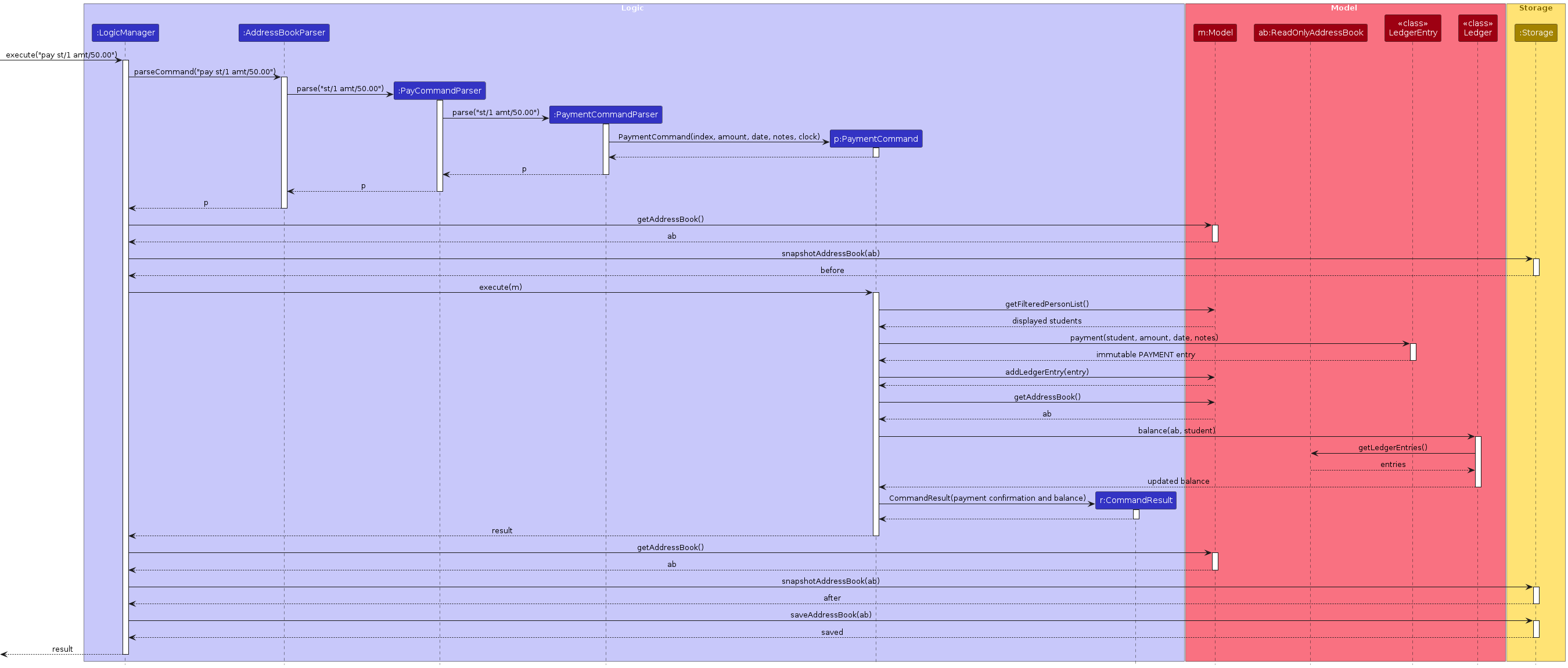
The following sequence diagram shows the pay st/1 amt/50.00 flow, including the ledger update,
updated balance, and save performed by LogicManager:
Reversals, withdrawals and dues
ChargeCommand records a manual charge or a charge reversal. WithdrawCommand appends a withdrawal only when
the student has enough available credit, so the withdrawal never creates a negative balance by itself.
PaymentReverseCommand and charge reverse append reversal entries rather than deleting the original row.
The account statement shows each reversal with the date of the entry it cancels. Move, single cancellation
and series cancellation reject changes to a billed lesson and preserve lesson and series UUIDs; series
cancellation validates the whole batch before replacing the address book.
Design considerations
Aspect: how to correct a financial entry
- Alternative 1 (current choice): append an opposite ledger entry.
- Pros: The original mistake remains visible, the balance can be recomputed, and a task can still refer to the original payment.
- Cons: The ledger grows with corrections and every calculation must treat reversals consistently.
- Alternative 2: edit or delete the original entry.
- Pros: The ledger has fewer rows.
- Cons: It hides that a correction happened and can break saved task links or audit expectations.
LogicManager(Model, Storage, Clock) passes a shared date source to the finance and relevant lesson
parsers/commands. Interactive constructors default to the system clock. Finance workflow tests use a
fixed Singapore clock, including scheduling/completion and payment, and cover a UTC/local-date boundary.
The snapshot/save flow persists every recorded payment. After a failed save, save retries without
recording another payment. Repeating pay intentionally adds another entry. Student filters do not change.
Student edits retain permanent financial references without changing amounts. Confirmed student deletion removes their
records and prompts even when they only have payment records and no lessons. Clearing data removes the ledger too.
JsonAdaptedLedgerEntry and the optional ledgerEntries collection in JsonSerializableAddressBook persist every
record. Loading validates IDs, amounts and student references. Older files load an empty ledger: completed lessons
are not billed retroactively, because their historical rate and payment state are unknown.
Documentation, logging, testing, dev-ops
Appendix: Requirements
Product scope
Target user profile:
- is an independent private tutor who teaches multiple students (around 20)
- teaches at several venues (students' homes, cafés and online), often with short travel gaps between lessons
- currently tracks lessons, homework, lesson notes and fees across calendars, chat apps, notebooks and spreadsheets
- prefers desktop apps over other types of applications, and works from a laptop between lessons
- can type fast and prefers typing to mouse interactions
- is reasonably comfortable using CLI apps
- is unwilling to spend a lot of time migrating existing data
Value proposition: TutorFlow gives a private tutor one place to organise and access information about their students, lessons, homework and payments. It answers "what does today require, what does each student need, and who still owes me" fast enough to use in the fifteen minutes between two lessons, which is faster than tracking the same information across spreadsheets, chats, calendars and personal notes.
User stories
Priorities: High (must have) - * * *, Medium (nice to have) - * *, Low (unlikely to have) - *
Student management
| No. | Priority | As a … | I want to … | So that I can… |
|---|---|---|---|---|
| 1 | * * * | private tutor | create a student profile with contact details, subjects, academic level and lesson rate | keep the information needed to teach them in one place |
| 2 | * * * | private tutor | view a student overview with their next lesson, outstanding homework, recent lesson notes and unpaid balance | prepare for the student without checking multiple sections |
| 3 | * * * | private tutor | search for students by name | access a student's record quickly |
| 4 | * * | private tutor | filter students by subject or academic level | find relevant groups of students |
| 5 | * * * | private tutor | update a student's profile | keep their information accurate when their circumstances change |
| 6 | * * | private tutor | archive a student who has stopped taking lessons | keep them out of my active list while their teaching and payment history remains available |
| 7 | * * * | private tutor | be warned about a possible duplicate when creating a student | avoid maintaining multiple records for the same person |
Lesson scheduling
| No. | Priority | As a … | I want to … | So that I can… |
|---|---|---|---|---|
| 8 | * * * | private tutor | schedule a lesson with its student, subject, date, time, duration and venue | have all the information needed to conduct the lesson |
| 9 | * * | private tutor | schedule recurring lessons | avoid entering regular weekly lessons individually |
| 10 | * * * | private tutor | view my lessons in a daily or weekly agenda | plan my teaching schedule and travel |
| 11 | * * * | private tutor | view all upcoming lessons for a specific student | review my commitments with them |
| 12 | * * * | private tutor | reschedule a lesson while retaining its existing details | record timetable changes efficiently |
| 13 | * * * | private tutor | cancel a lesson and record its cancellation status | keep my schedule and payment records accurate |
| 14 | * * * | private tutor | be warned when a lesson conflicts with another commitment | avoid double-booking myself |
| 15 | * * | travelling tutor | see consecutive lessons with insufficient travel time between their venues | identify schedules that may be impractical |
| 16 | * * * | private tutor | mark a lesson as completed, cancelled or missed | have an accurate record of what happened |
| 17 | * * * | private tutor | record preparation notes before a lesson and teaching notes afterward | continue effectively from one lesson to the next |
Homework management
| No. | Priority | As a … | I want to … | So that I can… |
|---|---|---|---|---|
| 18 | * * | private tutor | assign homework to a student with a description and due date | know what the student is expected to complete |
| 19 | * * | private tutor | view all outstanding and overdue homework across my students | identify which students require follow-up |
| 20 | * * | private tutor | update homework as assigned, submitted or reviewed, with overdue derived automatically | see its current status at a glance |
| 21 | * * | private tutor | edit an assignment's details | correct mistakes or accommodate changes |
| 22 | * * | private tutor | record feedback on submitted homework | remember the issues to discuss during the next lesson |
| 23 | * | private tutor | view a student's homework history | identify patterns in their completion and progress |
Payments
| No. | Priority | As a … | I want to … | So that I can… |
|---|---|---|---|---|
| 24 | * * | private tutor | record the fee charged for each completed lesson | calculate what each student owes |
| 25 | * * | private tutor | record a payment and associate it with the relevant student | keep their balance accurate |
| 26 | * * | private tutor | view each student's charges, payments and current balance | answer payment questions clearly |
| 27 | * * | private tutor | view all outstanding payments ordered by how long they have been unpaid | prioritise payment follow-ups |
| 28 | * * | private tutor | correct or reverse an incorrectly entered payment | prevent errors from permanently distorting my records |
| 29 | * | private tutor | export payment records for a selected period | use them for accounting and tax reporting |
Daily workflow
| No. | Priority | As a … | I want to … | So that I can… |
|---|---|---|---|---|
| 30 | * * * | private tutor | view a dashboard showing today's lessons, overdue homework and outstanding payments | know what requires my attention |
| 31 | * * | private tutor | create follow-up tasks linked to students, lessons, homework or payments | make sure important actions are not forgotten |
| 32 | * * | private tutor | undo a recent destructive action | recover from an accidental change |
| 33 | * * * | new user | access in-app guidance and examples | learn TutorFlow without relying on external documentation |
| 34 | * * | new user | experiment with sample records and remove them when I am ready | learn the application before entering real information |
| 35 | * | private tutor moving from another tracking system | import student records from a common file format | avoid re-entering all my existing information manually |
Workflow tools
| No. | Priority | As a … | I want to … | So that I can… |
|---|---|---|---|---|
| 36 | * * | private tutor | sort students by name | scan the list in a predictable order |
| 37 | * * | private tutor | record a remark about a student | keep useful personal context with the student |
| 38 | * * | private tutor | withdraw a student's available credit | return an overpayment without rewriting history |
| 39 | * * | private tutor | reverse a charge or payment | correct a mistaken financial entry without deleting it |
| 40 | * * | private tutor | cancel the future occurrences of a weekly series | stop regular bookings without cancelling them one by one |
| 41 | * * | private tutor | recall earlier commands with the Up and Down keys | correct or repeat a command without retyping it |
| 42 | * * | private tutor | use student-card shortcuts to prepare commands | avoid memorising every command prefix |
Use cases
(For all use cases below, the System is TutorFlow and the Actor is the tutor, unless specified otherwise)
Use case: UC1 - Add a student
MSS
Tutor requests to add a student, providing the student's name, phone number, level, subject(s) and lesson rate, and optionally an email and usual venue
TutorFlow adds the student and confirms the addition
Use case ends.
Extensions
1a. A required detail is missing or invalid.
1a1. TutorFlow shows an error message stating which detail is wrong and the accepted format.
Use case resumes at step 1.
1b. A student with the same name and phone number already exists.
1b1. TutorFlow rejects the request and tells the tutor that the student already exists.
Use case ends.
1c. A student with the same name but a different phone number already exists.
1c1. TutorFlow adds the student and warns the tutor that another student has the same name.
Use case ends.
2a. The data cannot be saved to disk.
2a1. TutorFlow tells the tutor that the change was applied in this session but could not be saved.
Use case ends.
Use case: UC2 - Schedule a lesson
MSS
Tutor requests to list students
TutorFlow shows a list of students
Tutor requests to schedule a lesson for a specific student, providing the date and time, and optionally the subject, duration and venue
TutorFlow adds the lesson and shows its details, warning if it overlaps another scheduled lesson
Use case ends.
Extensions
2a. The list is empty.
Use case ends.
3a. The given student does not exist.
3a1. TutorFlow shows an error message.
Use case resumes at step 2.
3b. A lesson detail is invalid, for example a date in the past or a lesson that would run past midnight.
3b1. TutorFlow shows an error message stating which detail is wrong.
Use case resumes at step 3.
3c. The subject is not one of the subjects the student is recorded as taking.
3c1. TutorFlow shows an error message.
Use case resumes at step 3.
3d. An identical lesson already exists.
3d1. TutorFlow rejects the request and tells the tutor that the lesson already exists.
Use case ends.
3e. The student takes several subjects and no subject was given.
3e1. TutorFlow names the student's subjects and asks for one with
s/SUBJECT.Use case resumes at step 3.
4a. The new lesson overlaps another scheduled lesson.
4a1. TutorFlow keeps the newly scheduled lesson and warns the tutor of the overlapping lesson.
The warning does not reject the scheduling request. See Overlap in the glossary for the conflict boundary; back-to-back lessons do not overlap.
Use case ends.
Use case: UC3 - Reschedule a lesson
MSS
Tutor requests to view the lessons of a specific student
TutorFlow shows a numbered list of the student's lessons
Tutor requests to reschedule a specific scheduled lesson, providing the new date, time, duration and/or venue
TutorFlow updates the lesson, keeping the details that were not changed, and shows the old and new details
Use case ends.
Extensions
2a. The student has no lessons.
Use case ends.
3a. The given lesson does not exist in the list.
3a1. TutorFlow shows an error message.
Use case resumes at step 2.
3b. The lesson is already completed, cancelled or missed.
3b1. TutorFlow tells the tutor that the lesson can no longer be rescheduled. A missed lesson should be replaced with a make-up booking.
Use case ends.
3c. The new date or time is invalid, for example a date in the past.
3c1. TutorFlow shows an error message stating which detail is wrong.
Use case resumes at step 3.
3d. The lesson has an active charge.
3d1. TutorFlow asks the tutor to reverse the charge before rescheduling.
Use case ends.
4a. The new time overlaps another scheduled lesson.
4a1. TutorFlow keeps the updated lesson details and warns the tutor of the overlapping lesson.
The warning does not undo the rescheduling request. Only scheduled lessons are considered for overlap, as defined in the glossary.
Use case ends.
Use case: UC4 - Record the outcome of a lesson
MSS
Tutor requests to view the agenda for a day
TutorFlow shows the lessons on that day
Tutor requests to mark a specific lesson as completed, optionally providing teaching notes
TutorFlow marks the lesson as completed, retains its booking details, saves any notes, records the lesson fee and confirms the outcome
Use case ends.
Extensions
2a. There are no lessons on that day.
Use case ends.
3a. The given lesson does not exist in the list.
3a1. TutorFlow shows an error message.
Use case resumes at step 2.
3b. The lesson is cancelled, or is scheduled for a future date.
3b1. TutorFlow tells the tutor that the lesson cannot be marked as completed.
Use case ends.
3c. The lesson is already completed.
3c1. If new notes are supplied, TutorFlow replaces the existing notes and confirms the update. Otherwise, it retains the existing notes and informs the tutor that the lesson is already completed.
No additional fee is recorded.
Use case ends.
3d. The tutor requests to mark the lesson as missed instead.
3d1. If the lesson is scheduled for today or earlier, TutorFlow marks it as missed, retains its booking details and notes, and confirms the update. No fee is recorded by this action.
A future, cancelled or completed lesson cannot be marked missed. Repeating the request on an already-missed lesson leaves it unchanged.
Use case ends.
3e. The teaching notes are invalid.
3e1. TutorFlow explains the notes constraint without changing the lesson or balance.
Use case resumes at step 3.
3f. The selected lesson was previously marked missed but actually took place.
- 3f1. TutorFlow continues at step 4, retaining the identity of the original lesson.
4a. The calculated fee rounds to zero, or the lesson already has an active charge.
4a1. TutorFlow completes the lesson without adding a charge and explains why. If the student's rate is zero, it also explains how to use
chargeto bill the lesson by hand.Use case ends.
Use case: UC5 - Assign homework and record feedback
MSS
Tutor requests to assign homework to a specific student, providing a description and a due date
TutorFlow records the homework as assigned and confirms the addition
Tutor requests to mark the homework as submitted
TutorFlow updates the status of the homework
Tutor requests to record feedback on the homework
TutorFlow saves the feedback and confirms the update
Use case ends.
Extensions
1a. The description is empty or the due date is invalid or in the past.
1a1. TutorFlow shows an error message stating which detail is wrong.
Use case resumes at step 1.
1b. The student already has identical homework with the same due date.
1b1. TutorFlow rejects the request and tells the tutor that the homework already exists.
Use case ends.
3a. The given homework does not exist.
3a1. TutorFlow shows an error message.
Use case resumes at step 3.
5a. The homework has not been submitted.
5a1. TutorFlow tells the tutor that feedback can only be recorded on submitted homework.
Use case resumes at step 3.
Use case: UC6 - Record a payment and check a student's balance
MSS
Tutor requests to record a payment from a specific student, providing the amount and optionally the date and notes
TutorFlow records the payment against the student and shows the student's updated balance
Tutor requests to view the student's account
TutorFlow shows the student's charges, payments and running balance
Use case ends.
Extensions
1a. The student does not exist.
1a1. TutorFlow shows an error message.
Use case resumes at step 1.
1b. The amount is not a positive number or the date is in the future.
1b1. TutorFlow shows an error message stating which detail is wrong.
Use case resumes at step 1.
2a. The payment is larger than the amount the student owes.
2a1. TutorFlow records the payment and shows that the student is in credit.
Use case resumes at step 3.
Use case: UC7 - Delete a student
MSS
Tutor requests to list students
TutorFlow shows a list of students
Tutor requests to delete a specific student in the list
TutorFlow shows the counts of lessons, homework, follow-up tasks and financial records that will be deleted with the student, but lists no individual record details, and asks for confirmation
Tutor confirms the deletion
TutorFlow deletes the student and all of their records, and confirms the deletion
Use case ends.
Extensions
2a. The list is empty.
Use case ends.
3a. The given index is invalid.
3a1. TutorFlow shows an error message.
Use case resumes at step 2.
4a. The student has no linked records.
4a1. TutorFlow deletes the student without asking for confirmation.
Use case ends.
5a. The tutor does not confirm the deletion.
5a1. TutorFlow keeps the student and all of their records.
Use case ends.
6a. The tutor runs
undoimmediately afterwards.6a1. TutorFlow restores the student and all of the deleted records.
Use case ends.
Use case: UC8 - Prepare for the day and for a lesson
MSS
Tutor opens TutorFlow
TutorFlow loads the saved data and shows the dashboard, listing today's lessons, lessons awaiting notes, overdue homework and outstanding payments
Tutor requests to view the overview of a specific student
TutorFlow shows the student's details, next lesson, recent lesson notes, outstanding homework and unpaid balance
Use case ends.
Extensions
2a. There is no saved data.
2a1. TutorFlow starts with an empty data set and shows a welcome message.
Use case ends.
2b. The saved data cannot be read.
2b1. TutorFlow does not start, explains why the file could not be opened, and leaves it unchanged for the next successful start.
Use case ends.
3a. The given student does not exist.
3a1. TutorFlow shows an error message.
Use case resumes at step 3.
Use case: UC9 - Undo the latest deletion or clear
MSS
Tutor deletes a student, homework item or task, or confirms
clear.Tutor requests to undo the latest destructive action.
TutorFlow restores the complete state from before that action and saves it.
Use case ends.
Extensions
1a. The destructive command fails or is rejected without confirmation.
1a1. TutorFlow keeps the previous undo point.
Use case resumes at step 2.
2a. There is no eligible undo point.
2a1. TutorFlow reports that there is nothing to undo.
Use case ends.
2b. Another successful change was made after the deletion.
2b1. TutorFlow reports that there is nothing to undo; the later change is not rolled back.
Use case ends.
Use case: UC10 - Schedule and cancel a weekly series
MSS
Tutor requests a weekly series for a student, giving the first date, time, count and optional gap.
TutorFlow validates every occurrence, adds the whole series, and reports the number scheduled.
Tutor later selects a displayed occurrence and requests
lesson series cancel INDEX confirm.TutorFlow cancels each future occurrence that is still scheduled and reports the number cancelled.
Use case ends.
Extensions
1a. Any occurrence is invalid or duplicates an existing lesson.
1a1. TutorFlow adds no occurrences and reports the first problem.
Use case ends.
2a. An occurrence overlaps another lesson.
2a1. TutorFlow schedules the series and reports the overlaps as warnings.
Use case resumes at step 3.
3a. The selected occurrence does not belong to a series, or no eligible occurrence remains.
3a1. TutorFlow reports that nothing was cancelled.
Use case ends.
3b. An eligible occurrence has an active charge.
3b1. TutorFlow leaves the whole series unchanged.
Use case ends.
Use case: UC11 - Track homework and follow-up tasks
MSS
Tutor assigns homework with a description and due date.
Tutor updates its status and records feedback, then creates a follow-up task linked to it.
Tutor views the homework and task history and marks the task done.
Use case ends.
Extensions
1a. The due date is before today or beyond one year.
1a1. TutorFlow rejects the assignment and states the accepted range.
Use case ends.
1b. The same student already has the same description and due date.
1b1. TutorFlow rejects the duplicate.
Use case ends.
2a. Feedback is requested before submission.
2a1. TutorFlow asks the tutor to mark the homework submitted or reviewed first.
Use case resumes at step 2.
2b. The homework is deleted while linked tasks exist.
2b1. TutorFlow requires confirmation and deletes the linked tasks with the homework.
Use case ends.
Use case: UC12 - Correct a payment, charge or withdrawal
MSS
Tutor lists payments or views a student's balance.
Tutor selects a payment or lesson charge to correct.
TutorFlow records a reversal, keeps the original entry, recalculates the balance and saves the result.
Tutor optionally records a replacement payment or charge.
Use case ends.
Extensions
1a. No payment list has been shown, or the selected payment index is invalid.
1a1. TutorFlow asks the tutor to run
pay listfirst.Use case ends.
2a. The selected entry was already reversed.
2a1. TutorFlow refuses to reverse it again.
Use case ends.
2b. A withdrawal is requested above available credit.
2b1. TutorFlow rejects the withdrawal and reports the available credit.
Use case ends.
Use case: UC13 - Archive and restore a student
MSS
Tutor selects an active student and requests archive.
TutorFlow hides the student from the active list while retaining all history.
Tutor later lists archived students, selects the student and requests restore.
TutorFlow returns the student to the active list.
Use case ends.
Extensions
1a. The student is already archived.
1a1. TutorFlow reports that no change was made.
Use case ends.
2a. The tutor tries to schedule new work for the archived student.
2a1. TutorFlow asks the tutor to restore the student first.
Use case ends.
3a. The student is already active.
3a1. TutorFlow reports that no change was made.
Use case ends.
Non-Functional Requirements
- Should work on any mainstream OS as long as it has Java
25or above installed. - Should work fully offline, and should not make any network connections.
- Should be able to hold up to 200 students and 10,000 lessons without noticeable sluggishness in performance for typical usage.
- Searching, listing and viewing commands should show their results within 1 second on a typical laptop with the data set size in NFR 3.
- Should start up and show the dashboard within 5 seconds on a typical laptop with the data set size in NFR 3.
- A user with above average typing speed for regular English text (i.e. not code, not system admin commands) should be able to accomplish most of the tasks faster using commands than using the mouse.
- Should save every change to disk before reporting that the command succeeded, so that no data is lost when the application is closed normally or when it is terminated after a command has completed.
- Should validate all user input before storing it, and should reject invalid dates, times, amounts and contact details with a message that names the invalid field and the accepted format.
- Should ask for confirmation before permanently deleting a student who has lessons, homework or payments, and before clearing all data.
- Should store all data only in a local file on the user's computer, and should not write students' contact details or fees to log files.
- Should store data in a human-readable text format that is documented in the Developer Guide, so that a tutor can back up the data by copying the data file.
- Should be able to load any data file saved by an earlier version of the same major version.
- Should be usable on screens with a resolution of 1280x720 and higher.
- Is for a single user only, and does not need to support several users editing the same data file.
Glossary
- Mainstream OS: Windows, Linux, Unix, or macOS
- Tutor: The user of TutorFlow, an independent private tutor who teaches multiple students
- Student: A person the tutor teaches, recorded with contact details, academic level, subjects, lesson rate and an optional usual venue
- Level: A student's academic level in the Singapore education system:
P1toP6(primary),S1toS5(secondary) orJ1toJ2(junior college) - Rate: The amount a student is charged for one hour of lesson, stored as a plain amount and displayed in dollars
- Duplicate student: A student with the same name and phone number as another student, after ignoring letter case and extra spaces
- Lesson: A teaching session with one student, with a subject, date, start time, duration and an optional venue
- Lesson status: The state of a lesson: scheduled (has not happened yet), completed (took place), cancelled (called off in advance) or missed (the student did not attend)
- Overlap: Two scheduled lessons on the same date whose time ranges share at least one minute. Lessons that end exactly when the next one starts do not overlap
- Agenda: A view of the tutor's lessons in time order for a day or a week
- Dashboard: The view shown on startup that lists what needs the tutor's attention today, such as today's lessons, lessons awaiting notes, overdue homework and outstanding payments
- Student overview: A single view of a student's details, next lesson, recent lesson notes, outstanding homework and unpaid balance
- Lesson notes: Free text that the tutor records about a lesson, such as what was covered and what the student needs to improve
- Homework status: The state of a homework item: assigned, submitted or reviewed. Homework that is still assigned after its due date is overdue
- Charge: The fee for one completed lesson, calculated from the student's rate and the lesson duration unless the tutor specifies another amount
- Payment: Money received from a student, recorded against the student rather than against a particular lesson
- Withdrawal: Money returned to a student from their available credit. It increases the amount the student owes
- Reversal: An opposite ledger entry that cancels a charge or payment without deleting either one
- Weekly series: A group of lessons scheduled together by
lesson repeat, at the same time on dates that are a fixed number of weeks apart - Travel buffer: The minimum number of minutes TutorFlow expects between lessons at different physical venues before it shows a travel warning
- Archived student: A student hidden from the active list while their lessons, homework, payments and history are retained
- Follow-up task: A to-do linked to one student, lesson, homework item or payment
- Dues: The students with a positive balance, ordered by their oldest unpaid charge
- Ledger entry: One immutable charge, payment, withdrawal or reversal in a student's financial history
- Displayed list: The numbered rows most recently shown by a list command; indexed commands take their numbers from it
- Undo point: The single pre-change snapshot that
delete,hw delete,task deleteorclear confirmleaves available toundo - Balance: The total charges, payment reversals and withdrawals minus the total payments and charge reversals of a student. A positive balance is outstanding, and a negative balance means the student is in credit
- Index: The position of an item in the list currently shown on screen, used by commands to refer to that item
- Prefix: A short label ending in
/, such asn/ord/, that marks the start of a command parameter - Data file: The local file in which TutorFlow saves all of its data
Appendix: Instructions for manual testing
Given below are instructions to test the app manually.
Note: These instructions only provide a starting point for testers to work on; testers are expected to do more exploratory testing.
For self-contained checks of lesson completion, missed status, teaching-note boundaries, changing lesson numbers and the correction features, see the lesson-outcome and correction test plan. It includes starting data, literal commands, expected results and a reproducible packaged-JAR test runner.
Launch and shutdown
Initial launch
Download the JAR file and copy it into an empty folder.
Open a terminal in that folder, check with
java -versionthat Java 25 is used, and runjava -jar tutorflow.jar.
Expected: The GUI opens with no students. The result box shows the welcome message and suggestsdemo. The window size may not be optimal.
Saving window preferences
Resize the window to an optimal size. Move the window to a different location. Close the window.
Relaunch the app with
java -jar tutorflow.jar.
Expected: The most recent window size and location are retained.
Dashboard, student overview and main window
Start with clear confirm, then demo, then demo confirm, and then set up one day of work. Run the commands in this order, because later steps use the lesson numbers that earlier ones show.
lesson add st/3 d/today t/16:00 dur/90
lesson add st/5 s/Physics d/today t/16:30 v/Online
lesson add st/6 d/today t/18:00
agenda
lesson cancel 3
lesson add st/4 s/Math d/2026-10-26 t/10:00 past/
lesson add st/2 s/Chemistry d/2026-10-26 t/17:00 past/
lesson list st/2 all/
lesson done 1
pay st/2 amt/20
Dashboard sections
Test case:
today
Expected: today's date, then four sections in this order.TODAY'S LESSONS (2, 2h 30m)lists Charlotte Oliveiro at 16:00 and Irfan Ibrahim at 16:30, both marked⚠ overlaps. Roy's cancelled lesson is left out.LESSONS AWAITING NOTES (1)listsMon 26 Oct David Li Math not yet marked completed.OVERDUE HOMEWORK (0)showsNo overdue homework.DUESshowsBernice Yu $40.00, witholdest unpaid N dayscounted from 26 Oct 2026.
Test case:
today extra
Expected:The 'today' command takes no parameters.TODAYandTodaywork liketoday.
Student overview
Test case:
view 3
Expected:Viewing: Charlotte Oliveiro, then her details and five sections.NEXT LESSONis today's 16:00 lesson. It stays the next lesson after 17:30 until it is marked completed or missed, because the next lesson is the first scheduled one from today onwards. The other sections showNo lesson notes yet.,0 completed · 0 cancelled · 0 missed,OUTSTANDING $0.00andNo outstanding homework.Test case:
lesson list st/2 all/,lesson done 1 n/Mole concept, thenview 2
Expected:Updated notes for: ...and no second charge. The overview showsMon 26 Oct 2026 Mole conceptunderRECENT LESSON NOTES,1 completedandOUTSTANDING $40.00.Test case:
lesson list st/5,lesson prep 1 n/Bring the mock paper, thenview 5
Expected:Preparation: Bring the mock paperunderNEXT LESSON.Test case:
archive 2,today, thenlist all/andview 2
Expected: The dues row readsBernice Yu (archived) $40.00 ..., and the overview starts withViewing: Bernice Yu (archived).Test case:
find charlotte, thenview 1
Expected: Charlotte's overview. The number comes from the list thatfinddisplayed.Incorrect commands to try:
view 0,view,view abc,view 1 2, thenview 99
Expected: The first four giveInvalid command format!and the usage.view 99givesThe student index provided is invalid. No student numbered 99 in the current list. The list has N item(s).
Main window
Test case: drag the window to its smallest size.
Expected: It stops at 450 by 600 pixels. The command box, result box and student list stay usable, and a long result scrolls inside the result box.Test case:
view 0, thentoday
Expected: The error appears in red in the result box, with no dialog. The next command's result is shown in the normal colour.Test case: press
F1.
Expected: The offline User Guide opens in its own window.Test case:
add n/Maximilian Alexander Constantine Wellington-Smythe Fitzgerald p/81234567 l/S2 s/Math r/40, with the window at its smallest size
Expected: The card shortens the name with….view INDEXshows the full name.
Empty dashboard (run this last, because it deletes the data the cases above use)
- Test case:
clear confirm, then close and reopen TutorFlow.
Expected: The dashboard is shown when TutorFlow starts. Each section shows its own empty message (No lessons today.,All past lessons are recorded.,No overdue homework.,No outstanding balances. Everyone is up to date.), andlesson done 1says to runagendaorlesson listfirst, because no lesson has a number yet.
- Test case:
Testing approach: dashboard, student overview and main window
We tested the dashboard (today), the student overview (view) and the main window in three ways.
1. Manual testing from the User Guide. We ran every case in the section above and the today and view examples in the UG, in the GUI, with the demo data, and compared the result with the UG.
2. Automated unit tests. TodayCommandTest and ViewCommandTest check each section, the empty states, the order of the rows, the 200-row cap, archived students and that neither command changes the displayed lists. TodayCommandTest and AgendaCommandTest check that students with the same name are told apart. PersonCardTest checks the (archived) label on the student card.
3. Edge-case testing with a fixed clock. Many dashboard cases depend on the date, so we ran command scripts through the real command logic and storage with a fixed clock that could be moved between steps. That way a lesson could be booked in the past and the dashboard checked "today", or a session could run past midnight. We also looked at the main window at 450×600 and 900×720 with long names, venues and remarks. The script is a throwaway tool and is not part of the repository:
| Area | What was tried |
|---|---|
| Input | today with text after it and in other letter cases; view with 0, negative, non-numeric, decimal, huge and out-of-range numbers, and two numbers |
| Dates | lessons earlier today, lessons later today, a lesson ending at midnight, the clock moving from 23:59 to 00:00, and a restart on the next day |
| Content | completed, missed and cancelled lessons today; 5 completed lessons, one of them without notes; homework assigned, submitted and overdue; debts, partial payments and credit |
| Students | archived students with debts and with lessons awaiting notes; two students with the same name; names of 100 characters and in Chinese |
| Scale | 205 lessons on one day and 205 awaiting notes |
The run found that two students with the same name looked identical in the lesson rows of today and agenda. They are now labelled as in the dues section, such as Alex Yeoh (phone ending 4567), and the tests above cover it. It also found that view accepted digits of other scripts, such as view ١. Only the digits 0-9 are accepted now, which AdversarialFindingsRegressionTest checks. Long names push the columns of the dashboard out of line, and a narrow window shortens long text on the student cards. Both are described in the UG.
Command box
Letter case of commands
- Test case:
LIST, thenLesson List st/1, thenDELETE 1 CONFIRM(on a student with no records)
Expected: Each runs as if typed in lower case. A prefix in upper case, such asN/, is still rejected.
- Test case:
History and failed commands
Test case: run
list, thenfind alex, thenbogus
Expected:bogusfails, is shown in red and stays in the command box.Press
Uprepeatedly, thenDownrepeatedly
Expected:find alex, thenlist, andUpagain changes nothing.Downwalks forward and the lastDownshowsbogusagain.
Student-card command shortcuts
Prerequisites:
clear confirm,demo,demo confirm.Hover over a student card, or move keyboard focus into the card.
Expected: Edit, Archive and Delete buttons appear and are reachable by keyboard. On a touch screen, tap the card once to reveal them.Click the card's Edit button, then the pencil beside the phone number.
Expected:edit 1 p/is in the command box and focused, andhelp editappears in the terminal where TutorFlow was launched. No student is changed.Type a replacement phone number after the prefix, then click the pencil beside the name.
Expected: The draft is replaced byedit 1 n/; the earlier partial phone draft is discarded.Click Cancel, then repeat with a field pencil and change some of the prepared text before clicking Cancel.
Expected: The unchanged prepared command is cleared. A command you edited is kept.Click Archive on the first card, then click the pencil on the second card.
Expected: Thearchive 1draft is replaced by the field command for the second card, and no data changes.Click the plus button beside the command box.
Expected:add n/is in the command box and focused. No student is created until you complete the command and press Enter.With a prepared shortcut still in the command box, run
list, a search, or another command that changes the displayed list.
Expected: An unchanged prepared command is cleared and editing mode closes. Text you typed yourself is kept, because it may be unrelated to the old list.
Undo
Undo a deletion, then try to use it again
Prerequisites:
clear confirm,demo,demo confirm, thendelete 2for a sample student with no linked records.Test case:
undo
Expected: The student returns, and the result says the deletion was undone.Test case:
undoagain
Expected:Nothing to undo. Undo restores your latest deletion or clear, and only until you make another change.
Undo is cleared by a later change
Prerequisites:
clear confirm,demo,demo confirm,delete 1, thenadd n/Chris p/91234567 l/J1 s/Math r/50.Test case:
undo
Expected: It fails with the "Nothing to undo" message; the deleted student is not restored and Chris remains.
Deleting a student
Deleting a student who has no lessons, homework, tasks or payments
Prerequisites:
clear confirm,demo,demo confirm. The sample students have no lessons.Test case:
delete 1
Expected: The 1st student is deleted at once and disappears from the list. The result box showsDeleted student:and the student's details.
Deleting a student who has lessons
Prerequisites:
clear confirm,demo,demo confirm,lesson add st/1 s/Math d/tmr t/16:00, thenagenda d/tmr.Test case:
delete 1
Expected: Nothing is deleted. The result box shows the student's name and phone number, the number of lessons, a warning about the upcoming lesson, andType 'delete 1 confirm' to proceed.Test case:
delete 1 confirm
Expected: The student and their lessons are deleted. Runagenda d/tmrand check that the lesson is gone.
Incorrect delete commands
Test case:
delete 0
Expected: No student is deleted. The result box showsInvalid command format!and the usage ofdelete.Test case:
delete x, where x is larger than the list size
Expected: No student is deleted. The result box says that no student has that number and how many items the list has.Other incorrect delete commands to try:
delete,delete 1 yes
Expected: Similar todelete 0.
Writing dates
Different ways of writing a date
Prerequisites:
clear confirm,demo,demo confirm.Test case:
lesson add st/3 s/Math d/22-Dec-26 t/16:30, thenlesson add st/3 s/Math d/2026/12/23 t/16:30, thenlesson add st/3 s/Math d/24 December 2026 t/16:30
Expected: Lessons are scheduled on 22, 23 and 24 December 2026, each shown in full in the reply.Test case:
lesson add st/3 s/Math d/12/22/2026 t/16:30, thenlesson add st/3 s/Math d/30/02/2026 t/16:30
Expected: Both rejected with the message that explains how a date is written.
Students
Start each group with clear confirm, then demo, then demo confirm, so the sample students are known.
Add, list, filter and find
Test case:
add n/Test Student p/98765432 l/S1 s/Math r/40
Expected: The student is added and appears in the active list.Test case:
list l/S3 s/Math, thenfind charlotte
Expected: The first command shows active S3 Math students; the second shows Charlotte Oliveiro with its new number.Test case:
remark 1 r/Prefers mornings, thenview 1
Expected: The remark appears on the overview;remark 1 r/clears it.Test case:
archive 1, thenlist archived/, thenrestore 1
Expected: The student is hidden from the active list, shown bylist archived/, and restored to the active list.
Sorting students
Test case:
sort desc, thenlist
Expected:Sorted all students by name (Z to A).The list is shown from Z to A and stays that way afterlist.sortalone sorts A to Z again.Test case:
sort up
Expected:Invalid command format!and the usage ofsort. The order is unchanged.
Student aliases
Test case:
student list l/S3 s/Math, thenstudent find charlotte, thenstudent view 1
Expected: Each works exactly like the same command withoutstudent, for examplelist l/S3 s/Math.Test case:
student, thenstudent foo
Expected: Both are rejected withStudent commands: add, edit, delete, find, view, list, archive, restore.
Lessons
Start each group with clear confirm, then demo, then demo confirm, so the sample students and empty lesson history are known.
Scheduling a lesson
Prerequisites:
clear confirm,demo,demo confirm. Student 1 takes Math and Physics; student 3 takes Math only.Test case:
lesson add st/3 d/tmr t/16:30 dur/90
Expected: A lesson is scheduled in Math at the student's venue. The result showsScheduled: ....Test case:
lesson add st/3 d/tmr t/16:30 dur/90again
Expected: The lesson is rejected as an exact duplicate.Test case:
lesson add st/1 d/tmr t/17:00
Expected: Rejected, because the student takes several subjects. The result names the subjects.Test case:
lesson add st/1 s/Math d/tmr t/17:00
Expected: Scheduled, and the result warns that it overlaps the first lesson.Other incorrect commands to try:
lesson add st/3 d/2020-01-01 t/16:30,lesson add st/3 d/tmr t/23:00 dur/120,lesson add st/0 d/tmr t/16:30,lesson add st/3
Expected: Nothing is scheduled. The result shows an error message.
Scheduling a weekly series
Prerequisites:
clear confirm, thendemo, thendemo confirm.Test case:
lesson repeat st/3 d/tmr t/16:00 count/4
Expected: The result saysScheduled 4 weekly occurrences.and that the new lessons are not in the displayed list.lesson list st/3then shows 4 lessons.Test case:
lesson repeat st/3 d/tmr t/16:00 count/4 past/
Expected: Rejected becausepast/is not accepted for a series.Test case:
lesson repeat st/3 d/tmr t/16:00 count/53
Expected: Rejected with the range message forcount/andevery/.
Viewing lessons
Prerequisites:
clear confirm, thendemo, thendemo confirm; schedulelesson add st/3 s/Math d/tmr t/16:30 dur/90andlesson add st/1 s/Math d/tmr t/17:00.Test case:
agenda d/tmr
Expected: Both lessons are listed in time order, each marked⚠ overlaps.Test case:
agenda week/ d/tmr
Expected: Seven days are shown, and days without lessons show— no lessons —.Test case:
agenda week/yes
Expected: An error that the flag takes no value.Test case:
lesson list st/3
Expected: The upcoming lessons of student 3 are listed and numbered.
Rescheduling and cancelling a lesson
Prerequisites:
clear confirm, thendemo, thendemo confirm; schedulelesson add st/3 d/tmr t/16:30, then runagenda d/tmr.Test case:
lesson move 1 t/20:00
Expected: The 1st lesson moves to 20:00 and keeps its subject and venue. Runagenda d/tmragain before another indexed command.Test case:
lesson move 1
Expected: An error that at least one ofd/,t/,dur/orv/is needed.Test case:
lesson cancel 1 r/Student unwell
Expected: The lesson is cancelled with its reason. Runagenda d/tmragain to see it listed as cancelled.Test case:
lesson cancel 1again, thenlesson move 1 d/tmr
Expected: Both are rejected because the lesson is already cancelled.Test case:
lesson cancel 99
Expected: An error that the lesson index is invalid.
Travel warnings
Prerequisites:
clear confirm,demo,demo confirm; addlesson add st/3 s/Math d/tmr t/09:00 dur/60andlesson add st/1 s/Math d/tmr t/10:10 dur/60.Test case:
travel buffer/30
Expected: The result includes10 min available; 30 min required, naming both students and their venues.Test case:
travel buffer/0
Expected: Travel warnings are disabled while overlap warnings remain.
Completing a lesson
Prerequisites:
clear confirm, thendemo, thendemo confirm; runlesson add st/3 d/2026-10-12 t/16:30 past/, thenagenda d/2026-10-12and note the lesson number.Test case:
lesson done 1 n/Covered algebra
Expected:Completed: .... Runview 3to see the notes and completed count. Reopen the app and check they are still present.Test case:
lesson list st/3 all/, thenlesson done 1 n/Revised notes, thenlesson done 1
Expected: Notes change toRevised notes, then remain unchanged. No extra lesson is created.Other incorrect commands to try: completion of a future or cancelled lesson,
lesson done 0,lesson done 1 n/, orlesson done 1 n/First n/Second
Expected: Rejected without changing the lesson or notes.
Recording a missed lesson and its preparation
Prerequisites:
clear confirm, thendemo, thendemo confirm; runlesson add st/3 d/2026-10-12 t/16:30 past/, thenagenda d/2026-10-12.Test case:
lesson missed 1, thenlesson missed 1again
Expected:Marked missed: ..., thenThat lesson is already marked as missed.Test case:
lesson done 1
Expected: The missed lesson is corrected to completed and the $45.00 charge is recorded.Prerequisites:
lesson add st/3 d/tmr t/16:30, thenagenda d/tmr.Test case:
lesson prep 1 n/Bring the mock paper, thenlesson prep 1 n/Past papers, thenlesson list st/3
Expected: The second preparation replaces the first, and the list shows[Preparation: Past papers].Test case:
lesson prep 1 n/
Expected: Rejected withEmpty value for n/; the preparation cannot be cleared.
Cancelling a weekly series
Prerequisites:
clear confirm, thendemo, thendemo confirm; runlesson repeat st/3 d/tmr t/16:00 count/4, thenlesson list st/3.Test case:
lesson series cancel 2
Expected: Rejected with the usage oflesson series cancel, becauseconfirmis missing.Test case:
lesson series cancel 2 confirm, thenlesson list st/3 all/
Expected:Cancelled 4 series occurrences.All four lessons are listed as cancelled.
Homework, tasks and finance
Homework lifecycle
Prerequisites:
clear,clear confirm, thendemo, thendemo confirm.Test case:
hw add st/1 desc/Algebra Q1-10 due/tmr, thenhw list
Expected: The homework is listed as assigned and numbered.Test case:
hw status 1 s/submitted, thenhw feedback 1 f/Sign errors, thenhw status 1 s/reviewed
Expected: The status becomes submitted, feedback is recorded, then the homework becomes reviewed.Test case:
hw edit 1 due/tmr, thenhw delete 1andhw delete 1 confirm
Expected: The due date changes; deletion asks for confirmation and removes the item.
Follow-up tasks
Test case:
task add st/1 desc/Call parent due/tmr, thentask list
Expected: The task is listed and numbered.Test case:
task edit 1 desc/Call parent again due/-,task done 1, thentask list all/
Expected: The text changes, the due date is removed, and the completed task is shown withall/.
Deleting and restoring a task
Prerequisites:
clear confirm, thendemo, thendemo confirm; runtask add st/1 desc/Call parent, thentask list.Test case:
task delete 1, thentask delete 1 confirm, thenundo, thentask list
Expected: The first command only asks for confirmation. The second deletes the task, andundobrings it back.
Payments, charges, withdrawals and dues
Prerequisites:
clear confirm;demo;demo confirm;lesson add st/3 d/2026-10-12 t/16:30 past/;agenda d/2026-10-12;lesson done 1.Test case:
pay st/3 amt/20, thenbalance st/3, thendues
Expected: The payment reduces the balance;dueslists any remaining debtor.Test case:
pay list, thenpay reverse 1, thenbalance st/3
Expected: The payment is marked reversed and the balance returns to its earlier amount.Test case:
charge l/1 amt/50(rejected, because completing the lesson already charged it), thencharge reverse l/1, thencharge l/1 amt/50, thencharge reverse l/1twice
Expected: The first charge is rejected as a duplicate. After the reversal, the $50 charge is added and reversed, and the second reversal reports that there is no active charge.Test case:
withdraw st/3 amt/1when the student has no credit
Expected: Rejected because there is no available credit.
Clear and demo
- Test case:
clear, thenclear confirm, thendemo, thendemo confirm
Expected:clearonly asks for confirmation;clear confirmempties the data;demopreviews loading;demo confirmloads the sample students.
- Test case:
Dashboard and travel buffer
Today's dashboard
Prerequisites:
clear confirm, thendemo, thendemo confirm.Test case:
today
Expected: The four sectionsTODAY'S LESSONS,LESSONS AWAITING NOTES,OVERDUE HOMEWORKandDUESare all shown, and empty ones say so.today nowis rejected becausetodaytakes no parameters.
Travel buffer
- Test case:
travel buffer/45, thentravel buffer/181
Expected:Travel buffer set to 45 minutes., then a rejection that gives the range 0-180.
- Test case:
Follow-up tasks: further cases
The dates in the following steps are written for a test run between 2 and 9 November 2026. If you test later, move every date forward by the same number of days so that each lesson date is still today or later; today and tmr always work. Dates with past/ must stay in the past.
Adding a task
Prerequisites: Start from the demo data. Run
list, thenlesson add st/1 s/Math d/2026-11-10 t/16:00andlesson list st/1.Test case:
task add st/1 desc/Call parent due/2026-11-20
Expected:Added task: Call parent. Run 'task list' to display its index.Test case:
task add lesson/1 desc/Prepare mock paper
Expected: The task is added without a due date.task listshows it as(no due date)with the lesson it is about.Test case: the same command again
Expected: Added again. Two tasks may have the same text.Other incorrect commands to try:
task add st/1 lesson/1 desc/Both(two links),task add desc/No link,task add st/1 desc/(empty text),task add st/1 desc/followed by 201 characters,task add st/1 desc/Late due/2026-10-01,task add st/99 desc/No such student,task add pay/1 desc/No payment list yet
Expected: Nothing is added. The result shows an error message. The late due date givesDue dates must be today or later.
Listing, editing and completing tasks
Prerequisites: Add three tasks, two of them with due dates, then run
task list.Test case:
task list
Expected: Open tasks are shown with the earliest due date first and the tasks without a due date last.Test case:
task edit 1 desc/Call parent again due/-
Expected: The text changes and the due date is removed.Test case:
task done 1, thentask done 1again
Expected: The first completes the task. The second says that the task is already done.task listhides it andtask list all/shows it.Test case: after
task done 1, runtask edit 2 desc/Changedwithout runningtask list
Expected: Task 2 of the last list is changed. The numbers stay fixed until the nexttask list.
Deleting a task
Prerequisites: Run
task listwith at least one task.Test case:
task delete 1
Expected: Nothing is deleted. TutorFlow asks you to typetask delete 1 confirm.Test case:
task delete 1 confirm, thentask delete 1 confirmagain
Expected: The first deletes the task. The second says that the task was deleted and to runtask listto refresh.
Tasks follow what they are about
Prerequisites: A task on the 1st student and a task on a lesson of that student.
Test case:
edit 1 n/Alexander Yeoh, thentask list
Expected: Both tasks show the new name.Test case:
lesson list st/1,lesson cancel 1, then book a new lesson in the same slot (for examplelesson add st/1 s/Math d/2026-11-10 t/16:00) and runtask list
Expected: The lesson task still points to the cancelled lesson. The new lesson does not take it over.Test case:
delete 1 confirm, thenundo
Expected: The tasks of the student are restored together with the student.
Edge-case and adversarial testing
These checks go beyond the example cases above. Unless a step says otherwise, start from the demo data: run clear confirm, then demo and demo confirm. We also ran these checks with a script (see "Testing approach" below).
Boundary values
Test case:
lesson add st/1 s/Math d/tmr t/23:45 dur/15,lesson add st/1 s/Math d/2026-11-09 t/23:00 dur/120
Expected: The first is scheduled. The second is rejected because it passes midnight.Test case:
lesson repeat st/1 s/Math d/tmr t/16:00 count/52 every/3
Expected: Rejected, because the series would pass two years.count/52with the default every week is accepted, as iscount/2.Test case:
lesson repeat st/1 s/Math d/tmr t/16:00 count/52, thenlesson repeat st/1 s/Physics d/tmr t/16:00 count/52(the demo student takes both subjects; the second series clashes with all 52 lessons of the first)
Expected: The first is accepted. The second gives a one-line overlap warning, then at most 30 rows of the renumbered list followed by... and N more.Runclear confirm,demoanddemo confirmafterwards to get the demo data back.
Inputs that must be rejected without crashing
Test case:
view ١,lesson add st/1 s/Math d/2026-11-09 t/09:00 dur/٦٠(non-English digits),pay st/1 amt/1e2,pay st/1 amt/-5,task add st/1 st/2 desc/Twice
Expected: Each shows an error message. Nothing changes and TutorFlow keeps running.Test case:
remark 1 r/followed by 1,001 characters, oredit 1 e/followed by an email longer than 254 characters
Expected: Rejected with a message about the maximum length.Test case:
pay st/1 amt/followed by 31 digits
Expected: Rejected at once with a message about the maximum length.
State that must survive a restart
Test case: After each of
lesson done,task done,pay,charge reverse, close and reopen TutorFlow.
Expected: The same data is shown as before closing.Test case: Starting again from the demo data, run
pay st/1 amt/100,pay list,withdraw st/1 amt/100,pay reverse 1, thendues
Expected: The student is listed as owing $100.00, and no error appears.
Edited data files
Prerequisites: Close TutorFlow and edit
data/tutorflow-v14.json.Test case: Set a student's
"rate"to"abc", a lesson's"duration"to0, or a ledger entry's"amount"to"-20.00", then launch.
Expected: TutorFlow starts with an empty list, and the result box says that the file was set aside as.corrupt.Test case: Delete the
"tasks"list, then launch.
Expected: TutorFlow starts normally with the students and lessons and no tasks.
Testing approach: lessons, tasks and payments
We tested the lesson, task and payment features (lesson scheduling, series and agenda, lesson status changes, follow-up tasks, and the ledger) in three ways.
1. Manual testing from the User Guide. We ran every example in the UG and the manual-testing appendix, in the GUI, with typical data, and compared the result with the specification in the tP notes.
2. Automated unit and integration tests. JUnit tests cover each parser and command, and workflow tests cover several commands in a row (for example lesson add, lesson move, lesson cancel, task add and undo).
3. Edge-case and adversarial testing on 1 Nov 2026. To find what the earlier tests missed, we ran a script that drives the real command logic with a fixed clock (1 Nov 2026). After every successful command it reloads the saved file and compares it with the data in memory. It ran about 17,000 checks. The script is a throwaway tool and is not part of the repository:
| Area | What was tried |
|---|---|
| Students | valid and invalid values at each limit, duplicate names, other languages, delete, clear and undo |
| Lessons | every date, time and duration limit, overlaps, series up to the two-year limit, all-or-nothing series, done, missed, cancel and move |
| Tasks | exactly one link, text limits, due dates, stable numbers after done and delete, links after edit, cancel and undo |
| Payments and charges | rounding of 100 rate and duration pairs, reversals, withdrawals, and 40 random sequences checked against a separate calculation of the balance |
| Data files | about 2,000 edited copies of a saved file (empty, wrong type, missing, duplicated or unknown links, huge values), each loaded and then used |
| Long input | up to 1,000,000 characters in each field, with timing |
| Random commands | 60 sessions of 400 random commands each |
The run found one crash (dues after a payment was reversed) and a data-loss risk (a field of more than 1,000,000 characters could be saved but not loaded again). Both are fixed, and each fix has JUnit tests in AdversarialFindingsRegressionTest. The manual cases under "Edge-case and adversarial testing" above are kept so that these checks can be repeated by hand.
Saving data
Dealing with missing/corrupted data files
Prerequisites: Close TutorFlow, then open
data/tutorflow-v14.jsonand damage it, for example by deleting its last}.Test case: Launch TutorFlow.
Expected: TutorFlow starts with an empty list. The result box says that the data file could not be read and has been set aside asdata/tutorflow-v14.json.corrupt, and the damaged file is in thedatafolder under that name.Test case: Add a student with
add n/Test p/91234567 l/S4 s/Math r/50, close TutorFlow and launch it again.
Expected: The student is still there, because it was saved to a newtutorflow-v14.json. The.corruptfile is unchanged.Test case: Close TutorFlow, delete
data/tutorflow-v14.jsonand launch TutorFlow.
Expected: With no legacy addressbook.json either, TutorFlow starts empty. Use demo confirm to load sample students.
Dealing with a data file that cannot be opened
Prerequisites: Close TutorFlow. As a user who is not an administrator, remove the read permission of
data/tutorflow-v14.json(for examplechmod 000). To test the migration, do this todata/addressbook.jsoninstead, with nodata/tutorflow-v14.json.Test case: Launch TutorFlow.
Expected: A dialog says that TutorFlow could not open the file and why, and that nothing has been changed. TutorFlow does not start, the file is not renamed, and no.corruptfile or new data file appears.Test case: Restore the permission and launch TutorFlow.
Expected: The students are loaded, or, for the older file, migrated into a newdata/tutorflow-v14.json.
Dealing with a data file that cannot be written
Prerequisites: Make
data/tutorflow-v14.jsonread-only, as a user who is not an administrator.Test case: Run
add n/Save Failure Test p/98765432 l/S1 s/Math r/40(use a fresh test name if that student already exists).
Expected: The student is added in this session, but the result box says that the change could not be saved and why. A read-only command such aslistdoes not test saving.exitdoes not close TutorFlow while the change remains unsaved. Restore write permission, runsave, then close and reopen to check that the student was saved; do not repeat theaddcommand.Test case: Make the file writable again, run
save, then close TutorFlow and launch it again.
Expected:saverepliesAll changes have been saved.and the student added in the previous step is still there. Runningsavewhen nothing is unsaved gives the same reply.
Data file versioning and domain extension
Data format appendix
Validation rules for stored text (moved from the User Guide):
Names, venues, reasons and notes must be printable text on one line; repeated spaces are collapsed. Email local parts may include %, the terminal domain label must contain at least two letters, and comparison ignores case.
Previously accepted names, short phone numbers, email terminal labels and venues remain readable when an older data file is loaded. Invalid subject counts (outside 1-10 distinct subjects) and invalid cancellation reasons reject the whole data file and use the recovery process below; individual records are never silently discarded.
The real JSON root is JsonSerializableAddressBook. Its saved form has these top-level keys:
| Key | Contents |
|---|---|
schemaVersion | The integer schema version, currently 19. |
travelBuffer | The saved travel buffer in minutes. |
studentOrder | ASCENDING or DESCENDING once sort has been used; omitted otherwise. |
persons | Student records, including stable IDs, archive state and contact details. |
lessons | Lesson records with student and series IDs and booking snapshots. |
homework | Homework records with their student IDs and feedback. |
ledgerEntries | Charges, payments, withdrawals and reversals. |
tasks | Follow-up tasks and their optional record links. |
Optional arrays are omitted when empty. Their shape is defined by the corresponding JsonAdapted* classes, and
Storage#snapshotAddressBook uses the same representation for dirty detection and atomic saves.
Person.getId() and Lesson.getId() are persisted UUIDs, distinct from visible indices and
from value equality. Lesson.getStudentId() links records across profile edits. Legacy lessons
are linked during loading; their missing academic level remains Optional.empty(). Newly
scheduled lessons use snapshotStudent exactly at creation. Reschedule, status changes,
preparation, profile edits, aggregate copying, and JSON round trips retain the historical level.
Archive and preparation participate in value equality, as does academic level; UUIDs do not.
Equal cancelled lessons remain separate records and exact-ID lookup chooses the edited record.
All domain extensions must update ReadOnlyAddressBook, AddressBook.resetData and its copy
constructor/equality, the real JSON root/adapters, and focused round-trip tests together.
Storage.snapshotAddressBook uses that exact persisted representation for dirty detection,
so UI-only equality must never decide whether a write is required. Schema 19 is written to
tutorflow-v14.json; VersionedAddressBookStorage reads legacy data only when the current
path is positively absent. The logic constructor's initial-save flag explicitly persists
migrated IDs even before a command mutates the model. Failed initial writes remain dirty.
The atomic writer creates only parent directories before its sibling temporary file. It never
precreates the current destination, so an interrupted first save leaves legacy fallback available
on restart. The storage writeSnapshot seam passes the actual serialized bytes to this writer.
Unreadable source protection is retained until positive absence or successful preservation.
StorageSchema.MINIMUM_VERSION and CURRENT_VERSION centralize the supported range (14 through 19 now).
The shared tutorflow-v14.json path stays fixed as later domains are added. Homework uses
schema 15, finance uses schema 16, follow-up tasks use schema 17, task payment links use schema 18 and withdrawals
use schema 19; the next domain must advance it to 20. Each build accepts unversioned legacy
data and versions 14 through its current version, with explicit defaults for missing older fields.
Add prior-version loading and future-version refusal tests alongside each schema increment.
The data file's top-level keys are schemaVersion, travelBuffer, studentOrder, persons,
lessons, homework, ledgerEntries and tasks. studentOrder and the later arrays are
omitted when they have no value or no records. JsonSerializableAddressBook is the single
source for those keys, and Storage#snapshotAddressBook serializes the same representation for
change detection and saves.
Storage checks the raw JSON schema before binding current student/lesson fields. An unsupported
version produces UnsupportedSchemaException as the cause of DataLoadingException; MainApp.init
propagates it before constructing a model, logic, or UI. The original stays at its original path,
and storage refuses subsequent saves. Never route this exception through corruption recovery or
silently ignore newer domain fields. Users need a compatible binary or a matching backup.
A file that cannot be opened is not corrupt. JsonAddressBookStorage#isAccessFailure tells a failure
to open or read a file, which is an IOException that is not a JsonProcessingException, from
invalid content. Only invalid content is set aside. A file that another program holds, or that the
permissions forbid reading, can well be valid, so setting it aside would hide the records of a tutor,
and for the legacy file it would stop them from ever being migrated. MainApp therefore refuses to
start in the same way as for an unsupported schema, with a message that names the file and the
reason, and JsonAddressBookStorage#requireOpenedSource makes every save refuse to replace the file.
The next start that can open the file loads or migrates it.
CommandResult.getDisplayedLessons() carries an immutable typed snapshot in the same order as
the rendered lesson numbers. withDisplayedLessons and withFeedback retain it across numbering
refreshes and unsaved warnings, so LogicManager can avoid rendering duplicate refreshes without
parsing command feedback. Homework, payment and task lists use the same shown-ID rule.
Homework model and storage
Homework is immutable and persists its UUID, student UUID, normalized description, due date,
HomeworkStatus, and optional feedback. Its full equality includes identity and all persisted
fields. Overdue is computed from ASSIGNED and the caller's local date, never stored as a fourth
status. HomeworkQueries centralizes selection, ordering, current student labels, and summaries.
HomeworkCommandParser(Clock) makes date bounds and today/tmr deterministic. New assignments
and changed due dates use today through one calendar year; unchanged historical dates are retained.
AddressBook owns the homework list and validates duplicate assignments/IDs and student links.
Copy/reset/equality/hash, student cascade deletion, clear, and the real JSON adapter include the
domain. Missing homework in older files defaults explicitly to empty. Schema validation still
precedes field binding. Storage.snapshotAddressBook includes every homework field, so feedback,
status, and description-only changes participate in dirty detection and retry.
Model.showHomework(List<Homework>) stores an immutable snapshot only when hw list renders a
new numbered list. getDisplayedHomework() retains those rows even after mutations or deletion;
it must never be treated as the current database. Indexed commands take the shown row's UUID and
resolve it against getAddressBook().getHomeworkList(). A deleted ID produces an error without
renumbering remaining rows. Changes, archive, student rename, reset, and failed writes leave the
selection untouched. A retained identity can become selectable again after undo, but the existing row is not
renumbered automatically.
Linked tasks resolve homework indices by the same shown-ID rule, then persist the row's UUID.
CommandResult.getDisplayedHomework() exposes optional immutable typed rows for the numbered
list. withFeedback retains them across unsaved warnings. Non-indexed overview and dashboard
summaries deliberately do not replace the selection, so no feedback-string parsing is required.
Task-parent guards wrap homework and student deletion before removing any record, preventing
orphaned tasks.
Focused regression tests cover historical feedback, schema progression and refusal, duplicate/orphan rejection, due-date boundaries, lifecycle correction, guarded deletion, filtered numbering, archive, rename, actual JSON restart, failed saves, protected original bytes, and retry before exit.
Appendix: Effort
TutorFlow started from AB3's one entity and command pipeline. It now has six persisted domains: students, lessons, homework, follow-up tasks, finance and the saved travel/sort settings. Each domain has its own model validation, immutable records, command and parser layer, JSON adapter, cascade rules and focused tests. The team also added undo, offline help, a CLI-driven GUI, schema migration and failure-recovery handling.
The main difficulty was keeping numbered selections stable when the displayed rows changed, while still keeping the models and storage snapshots consistent. The finance ledger required exact decimal arithmetic, reversals and dues without rewriting history. Daily scheduling added overlap checks, travel warnings, weekly-series rollback and date boundaries.
Reused work is limited to the AB3 architecture and testing approach, JavaFX, Jackson, commonmark-java, Material Design Icons, JUnit 5, Monocle, Checkstyle, JaCoCo, MarkBind and PlantUML.